在 2024 年, 我花了一些时间探索如何在安卓上使用 KVM 虚拟化运行 Linux 甚至 Windows, 整理了资料, 做了一些内核移植的工作, 顺便(应该是全网首发的)找到了在天玑 1100/1200 等能访问 EL2 的 SoC 上运行 Windows on ARM 的方法:
安卓上 KVM 虚拟机运行 Linux/Windows on ARM 安卓生产力探索 - 安卓运行 Windows/Linux, 视频输出, 内核编译, KVM 虚拟化以及更多
(建议先阅读上述文章, 我在其中介绍了不少虚拟化的背景, 本文不再重复)
现在时过境迁, 随着谷歌的大力推动, 出厂安卓版本为 15 的机器已经强制要求加入原生的虚拟化支持了, 安卓 16 已经内置了 终端 App 可以运行 Debian 虚拟机. (尽管同时带来了邪恶的可信计算 , 但算是坏心办了半件好事吧)
在 2026 年, 我的 OnePlus 13 上的 Snapdragon 8 Elite CPU/GPU 都早已吊打我的笔记本 (i3-11300H), 这些性能只能用来启动 QQ 微信支付宝这种国产垃圾实在是浪费; 不妨让我们尝试在上面跑个正经 VM, 还更好的利用一下性能.
虚拟化现况 看一下虚拟化的现况: 除了之前就有的 Tensor 芯片的 pKVM 支持, 现在 Qualcomm 和 MediaTek 的新芯片, 也响应号召被迫加入了虚拟化支持.
Qualcomm 与 Tensor 的 pKVM 不同, 高通从 Snapdragon 8 Gen 2 开始加入 Gunyah 支持. (这是个什么鬼单词)
Gunyah 是高通自研的一个开源 Hypervisor , 运行在 EL2 并占据 EL2, 为 EL1 的内核提供必要的接口用于运行可信的 VM, 在 Linux (安卓) 中被识别为 /dev/gunyah (而不是更常见且支持更广泛的 /dev/kvm)
(我们在上文已知, 如果把 EL2 直接提供给内核, 内核就能提供 KVM 支持, 所以绕这么一圈显然就是为了不信任 kernel, 为各种 anti-user feature 比如 DRM 或者端侧不开源 LLM 提前做准备, so Google, f**k u)
虽然理论上 Gunyah 从 8 Gen 2 就开始支持了, 但早期设备附带的 Gunyah 实现有些问题 (会强制使用其 firmware 需要额外 workaround). 在 8 Elite 及以后的设备才解决.
联发科这边, 从天玑 9000 系列开始支持 GenieZone, 和高通的实现很像, 同样是其自研的 Hypervisor, 在 EL2 运行, 被识别为 /dev/gzvm
根据网络资料 , 由于 GenieZone 支持普通的(不受内存保护的) VM, 天玑 9000 系列可以直接在安卓 16 的终端中启动 Debian 虚拟机, 解锁 BL 并 root 后应该也可以用 crosvm 就能运行自定义的 VM. 不过由于我没有设备实测, 本文就不涉及 GenieZone 的使用了.
其他厂商 Samsung 的 Exynos 2500 看起来也支持使用终端 App 运行 Debian , 但其使用的具体技术不明.
Google 的 Tensor 全系芯片在开头就说了, 支持原生的 KVM 和 pKVM, 可直接启动 QEMU.
至于一些国产厂商的神秘自研芯片, 由于无充足网络资料可考, 以及我没有可用的实机, 其对虚拟化的支持仍然不明.
探索 Gunyah 运行 VM 至本文发布时, 高通已经发布的设备 (最新 8 Elite Gen 5) 全系均只支持 protected VM, 即使你安装了安卓 16, 也看不到内置的终端 APP. 如果使用一些手段强行打开, 也会报错 java.lang.UnsupportedOperationException: Non-protected VMs are not supported on this device.
Gunyah 虽然是开源的, 但它的实现放在 hyp 分区里, hyp 分区在量产机型上又受到 XBL 的签名验证, 强行修改只能得到黑砖或红字无法启动的机器, 即使解锁了 Bootloader (ABL), 我们也只能使用厂商发布的 Gunyah firmware.
看来我们不得不想办法戴着镣铐跳舞, 看看如何在强制 VM 内存受保护的 Gunyah hypervisor 下启动自己的 VM 了.
事前准备 首先我们需要有一台已经解锁 Bootloader 且已经 Root 的骁龙 8 Elite 或以后的设备, 运行 >= Android 15 的系统.
我使用的是运行 Android 16 (Evolution X 11) 的 OnePlus 13, kernel 版本 6.6.126.
检查一下必要的 Gunyah 设备是否已经就绪:
1
2
3
OP5D0DL1:/ $ su OP5D0DL1:/ /dev/gunyah
Crosvm 目前 QEMU 还不支持调用这些 Arm 新出的 Hypervisor. 我们这次只能使用 Google 做的 crosvm 这个开源 VMM.
安卓手机已经在 /apex/com.android.virt/bin/crosvm 内置了一个 crosvm, 那看起来事情十分简单了.
我们根据高通的文档 以及 crosvm 自己的帮助信息, 看起来并不复杂, 可以直接通过 Linux boot protocol 引导启动一个 Linux.
从 Debian 的 cdimage 站点 下载一份 debian-12-nocloud-arm64.raw 文件, 现在一台正常的 Linux 电脑上提取出其中的 initrd 和 vmlinuz (Linux 内核) 这两个引导所需的文件:
1
2
3
4
5
6
7
8
9
10
11
12
13
14
15
16
17
test @epyc:~$ fdisk -l debian-12-nocloud-arm64.raw(...) Device Start End Sectors Size Type debian-12-nocloud-arm64.raw1 262144 6289407 6027264 2.9G Linux root (ARM-64) debian-12-nocloud-arm64.raw15 2048 262143 260096 127M EFI System test @epyc:~$ sudo losetup -Pf debian-12-nocloud-arm64.rawtest @epyc:~$ losetup -a/dev/loop26: []: (/home/test/debian-12-nocloud-arm64.raw) test @epyc:~$ sudo mount /dev/loop26p1 tmptest @epyc:~$ cd tmp/boot && ls -ltotal 61744 -rw-r--r-- 1 root root 291293 5月 27 05:29 config-6.1.0-49-arm64 drwxr-xr-x 2 root root 4096 6月 1 13:04 efi drwxr-xr-x 5 root root 4096 6月 1 14:00 grub -rw-r--r-- 1 root root 29958431 6月 1 14:00 initrd.img-6.1.0-49-arm64 -rw-r--r-- 1 root root 83 5月 27 05:29 System.map-6.1.0-49-arm64 -rw-r--r-- 1 root root 32954304 5月 27 05:29 vmlinuz-6.1.0-49-arm64
从里面捞出需要的 initrd.img-6.1.0-49-arm64 和 vmlinuz-6.1.0-49-arm64 两个文件, 直接 adb push 到手机的 /data/local/tmp 里暂存. 把 debian-12-nocloud-arm64.raw 也放到同一文件夹里.
好了, 直接用 crosvm 启动!
1 /apex/com.android.virt/bin/crosvm --log-level=debug run --hypervisor gunyah --disable-sandbox --cpus 2 --mem 1024 --initrd initrd.img-6.1.0-49-arm64 --protected-vm-without-firmware --block debian-12-nocloud-arm64.raw,lock=false vmlinuz-6.1.0-49-arm64
启动日志非常愉快的翻滚, 一秒过后… 卧槽手机怎么黑屏了.
展开日志全文 1 2 3 4 5 6 7 8 9 10 11 12 13 14 15 16 17 18 19 20 21 22 23 24 25 26 27 28 29 30 31 32 33 34 35 36 37 38 39 40 41 42 43 44 45 46 47 48 49 50 51 52 53 54 55 56 57 58 59 60 61 62 63 64 65 66 67 68 69 70 71 72 73 74 75 76 77 78 79 80 81 82 83 84 85 86 87 88 89 90 91 92 93 94 95 96 97 98 99 100 101 102 103 104 105 106 107 108 109 110 111 112 113 114 115 116 117 118 119 120 121 122 123 124 125 126 127 128 129 130 131 132 133 134 135 136 137 138 139 140 141 142 143 144 145 146 147 148 149 150 151 152 153 154 155 156 157 158 159 160 161 162 163 164 165 166 167 168 169 170 171 172 173 174 175 176 177 178 179 180 181 182 183 184 185 186 187 188 189 190 191 192 193 194 195 196 197 198 199 200 201 202 203 204 205 206 207 208 209 210 211 212 213 214 215 216 217 218 219 220 221 222 223 224 225 226 227 228 229 230 231 232 233 234 235 236 237 238 239 240 241 242 243 244 245 246 247 248 249 [2026-06-15T09:00:07.864025329+00:00 DEBUG crosvm::crosvm::sys::linux] creating hypervisor: Gunyah { device: None, qcom_trusted_vm_id: None, qcom_trusted_vm_pas_id: None } [2026-06-15T09:00:07.866230329+00:00 INFO crosvm::crosvm::sys::linux::device_helpers] Trying to attach block device: debian-12-nocloud-arm64.raw [2026-06-15T09:00:07.866881579+00:00 INFO disk] disk size 3221225472 [ 0.000000] Booting Linux on physical CPU 0x0000000000 [0x000f0480] [ 0.000000] Linux version 6.1.0-49-arm64 ([email protected] ) (gcc-12 (Debian 12.2.0-14+deb12u1) 12.2.0, GNU ld (GNU Binutils for Debian) 2.40) #1 SMP Debian 6.1.174-1 (2026-05-26) [ 0.000000] random: crng init done [ 0.000000] Machine model: linux,dummy-virt [ 0.000000] efi: UEFI not found. [ 0.000000] NUMA: No NUMA configuration found [ 0.000000] NUMA: Faking a node at [mem 0x0000000080000000-0x00000000bfffffff] [ 0.000000] NUMA: NODE_DATA [mem 0xbbdef380-0xbbdf1fff] [ 0.000000] Zone ranges: [ 0.000000] DMA [mem 0x0000000080000000-0x00000000bfffffff] [ 0.000000] DMA32 empty [ 0.000000] Normal empty [ 0.000000] Movable zone start for each node [ 0.000000] Early memory node ranges [ 0.000000] node 0: [mem 0x0000000080000000-0x00000000bfffffff] [ 0.000000] Initmem setup node 0 [mem 0x0000000080000000-0x00000000bfffffff] [ 0.000000] cma: Reserved 64 MiB at 0x00000000b6c00000 [ 0.000000] psci: probing for conduit method from DT. [ 0.000000] psci: PSCIv1.1 detected in firmware. [ 0.000000] psci: Using standard PSCI v0.2 function IDs [ 0.000000] psci: MIGRATE_INFO_TYPE not supported. [ 0.000000] psci: SMC Calling Convention v1.3 [ 0.000000] percpu: Embedded 31 pages/cpu s86760 r8192 d32024 u126976 [ 0.000000] Detected PIPT I-cache on CPU0 [ 0.000000] CPU features: detected: Address authentication (architected QARMA5 algorithm) [ 0.000000] CPU features: detected: GIC system register CPU interface [ 0.000000] CPU features: detected: Hardware dirty bit management [ 0.000000] CPU features: detected: Spectre-v4 [ 0.000000] CPU features: detected: Spectre-BHB [ 0.000000] alternatives: applying boot alternatives [ 0.000000] Fallback order for Node 0: 0 [ 0.000000] Built 1 zonelists, mobility grouping on. Total pages: 258048 [ 0.000000] Policy zone: DMA [ 0.000000] Kernel command line: panic=-1 console=ttyS0 [ 0.000000] Dentry cache hash table entries: 131072 (order: 8, 1048576 bytes, linear) [ 0.000000] Inode-cache hash table entries: 65536 (order: 7, 524288 bytes, linear) [ 0.000000] mem auto-init: stack:all(zero), heap alloc:on, heap free:off [ 0.000000] Memory: 69064K/1048576K available (13248K kernel code, 2804K rwdata, 9504K rodata, 6464K init, 627K bss, 147972K reserved, 65536K cma-reserved) [ 0.000000] SLUB: HWalign=64, Order=0-3, MinObjects=0, CPUs=2, Nodes=1 [ 0.000000] ftrace: allocating 44173 entries in 173 pages [ 0.000000] ftrace: allocated 173 pages with 5 groups [ 0.000000] trace event string verifier disabled [ 0.000000] rcu: Hierarchical RCU implementation. [ 0.000000] rcu: RCU restricting CPUs from NR_CPUS=256 to nr_cpu_ids=2. [ 0.000000] Rude variant of Tasks RCU enabled. [ 0.000000] Tracing variant of Tasks RCU enabled. [ 0.000000] rcu: RCU calculated value of scheduler-enlistment delay is 25 jiffies. [ 0.000000] rcu: Adjusting geometry for rcu_fanout_leaf=16, nr_cpu_ids=2 [ 0.000000] NR_IRQS: 64, nr_irqs: 64, preallocated irqs: 0 [ 0.000000] GICv3: 988 SPIs implemented [ 0.000000] GICv3: 1024 Extended SPIs implemented [ 0.000000] Root IRQ handler: gic_handle_irq [ 0.000000] GICv3: GICv3 features: 16 PPIs, DirectLPI [ 0.000000] GICv3: CPU0: found redistributor 0 region 0:0x000000003ffb0000 [ 0.000000] rcu: srcu_init: Setting srcu_struct sizes based on contention. [ 0.000000] arch_timer: cp15 timer(s) running at 19.20MHz (virt). [ 0.000000] clocksource: arch_sys_counter: mask: 0xffffffffffffff max_cycles: 0x46d987e47, max_idle_ns: 440795202767 ns [ 0.000000] sched_clock: 56 bits at 19MHz, resolution 52ns, wraps every 4398046511078ns [ 0.000012] arm-pv: using stolen time PV [ 0.000163] Console: colour dummy device 80x25 [ 0.000264] Calibrating delay loop (skipped), value calculated using timer frequency.. 38.40 BogoMIPS (lpj=76800) [ 0.000265] pid_max: default: 32768 minimum: 301 [ 0.000346] LSM: Security Framework initializing [ 0.000491] landlock: Up and running. [ 0.000491] Yama: disabled by default; enable with sysctl kernel.yama.* [ 0.000857] AppArmor: AppArmor initialized [ 0.000858] TOMOYO Linux initialized [ 0.000861] LSM support for eBPF active [ 0.001006] Mount-cache hash table entries: 2048 (order: 2, 16384 bytes, linear) [ 0.001103] Mountpoint-cache hash table entries: 2048 (order: 2, 16384 bytes, linear) [ 0.004758] cblist_init_generic: Setting adjustable number of callback queues. [ 0.004758] cblist_init_generic: Setting shift to 1 and lim to 1. [ 0.004857] cblist_init_generic: Setting adjustable number of callback queues. [ 0.004858] cblist_init_generic: Setting shift to 1 and lim to 1. [ 0.005272] rcu: Hierarchical SRCU implementation. [ 0.005272] rcu: Max phase no-delay instances is 1000. [ 0.008720] EFI services will not be available. [ 0.009280] smp: Bringing up secondary CPUs ... [ 0.010535] Detected PIPT I-cache on CPU1 [ 0.010586] GICv3: CPU1: found redistributor 1 region 0:0x000000003ffd0000 [ 0.010712] CPU1: Booted secondary processor 0x0000000001 [0x000f0480] [ 0.011185] smp: Brought up 1 node, 2 CPUs [ 0.011187] SMP: Total of 2 processors activated. [ 0.011188] CPU features: detected: Branch Target Identification [ 0.011190] CPU features: detected: Instruction cache invalidation not required for I/D coherence [ 0.011191] CPU features: detected: Data cache clean to the PoU not required for I/D coherence [ 0.011191] CPU features: detected: Common not Private translations [ 0.011191] CPU features: detected: CRC32 instructions [ 0.011192] CPU features: detected: Data cache clean to Point of Deep Persistence [ 0.011192] CPU features: detected: Data cache clean to Point of Persistence [ 0.011192] CPU features: detected: E0PD [ 0.011193] CPU features: detected: Enhanced Counter Virtualization [ 0.011193] CPU features: detected: Enhanced Privileged Access Never [ 0.011194] CPU features: detected: Generic authentication (architected QARMA5 algorithm) [ 0.011194] CPU features: detected: RCpc load-acquire (LDAPR) [ 0.011194] CPU features: detected: LSE atomic instructions [ 0.011195] CPU features: detected: Privileged Access Never [ 0.011195] CPU features: detected: Random Number Generator [ 0.011195] CPU features: detected: Speculation barrier (SB) [ 0.011196] CPU features: detected: TLB range maintenance instructions [ 0.011196] CPU features: detected: Speculative Store Bypassing Safe (SSBS) [ 0.011308] CPU: All CPU(s) started at EL1 [ 0.011341] alternatives: applying system-wide alternatives [ 0.084859] node 0 deferred pages initialised in 68ms [ 0.085557] devtmpfs: initialized [ 0.087180] Registered cp15_barrier emulation handler [ 0.087181] setend instruction emulation is not supported on this system [ 0.087353] clocksource: jiffies: mask: 0xffffffff max_cycles: 0xffffffff, max_idle_ns: 7645041785100000 ns [ 0.087502] futex hash table entries: 512 (order: 3, 32768 bytes, linear) [ 0.087806] pinctrl core: initialized pinctrl subsystem [ 0.088338] DMI not present or invalid. [ 0.088837] NET: Registered PF_NETLINK/PF_ROUTE protocol family [ 0.099750] DMA: preallocated 128 KiB GFP_KERNEL pool for atomic allocations [ 0.099829] DMA: preallocated 128 KiB GFP_KERNEL|GFP_DMA pool for atomic allocations [ 0.099900] DMA: preallocated 128 KiB GFP_KERNEL|GFP_DMA32 pool for atomic allocations [ 0.099914] audit: initializing netlink subsys (disabled) [ 0.100205] audit: type=2000 audit(0.092:1): state=initialized audit_enabled=0 res=1 [ 0.100635] thermal_sys: Registered thermal governor 'fair_share' [ 0.100636] thermal_sys: Registered thermal governor 'bang_bang' [ 0.100637] thermal_sys: Registered thermal governor 'step_wise' [ 0.100638] thermal_sys: Registered thermal governor 'user_space' [ 0.100638] thermal_sys: Registered thermal governor 'power_allocator' [ 0.100645] cpuidle: using governor ladder [ 0.100647] cpuidle: using governor menu [ 0.100741] hw-breakpoint: found 6 breakpoint and 4 watchpoint registers. [ 0.100855] ASID allocator initialised with 65536 entries [ 0.101295] Serial: AMBA PL011 UART driver [ 0.102526] KASLR enabled [ 0.108613] HugeTLB: registered 1.00 GiB page size, pre-allocated 0 pages [ 0.108615] HugeTLB: 0 KiB vmemmap can be freed for a 1.00 GiB page [ 0.108616] HugeTLB: registered 32.0 MiB page size, pre-allocated 0 pages [ 0.108617] HugeTLB: 0 KiB vmemmap can be freed for a 32.0 MiB page [ 0.108618] HugeTLB: registered 2.00 MiB page size, pre-allocated 0 pages [ 0.108619] HugeTLB: 0 KiB vmemmap can be freed for a 2.00 MiB page [ 0.108619] HugeTLB: registered 64.0 KiB page size, pre-allocated 0 pages [ 0.108620] HugeTLB: 0 KiB vmemmap can be freed for a 64.0 KiB page [ 0.110973] ACPI: Interpreter disabled. [ 0.111321] iommu: Default domain type: Translated [ 0.111323] iommu: DMA domain TLB invalidation policy: strict mode [ 0.111723] pps_core: LinuxPPS API ver. 1 registered [ 0.111724] pps_core: Software ver. 5.3.6 - Copyright 2005-2007 Rodolfo Giometti <[email protected] > [ 0.111728] PTP clock support registered [ 0.111739] EDAC MC: Ver: 3.0.0 [ 0.112735] NetLabel: Initializing [ 0.112737] NetLabel: domain hash size = 128 [ 0.112738] NetLabel: protocols = UNLABELED CIPSOv4 CALIPSO [ 0.112748] NetLabel: unlabeled traffic allowed by default [ 0.112857] vgaarb: loaded [ 0.113088] clocksource: Switched to clocksource arch_sys_counter [ 0.113924] VFS: Disk quotas dquot_6.6.0 [ 0.113956] VFS: Dquot-cache hash table entries: 512 (order 0, 4096 bytes) [ 0.114501] AppArmor: AppArmor Filesystem Enabled [ 0.114510] pnp: PnP ACPI: disabled [ 0.117887] NET: Registered PF_INET protocol family [ 0.118650] IP idents hash table entries: 16384 (order: 5, 131072 bytes, linear) [ 0.119231] tcp_listen_portaddr_hash hash table entries: 512 (order: 1, 8192 bytes, linear) [ 0.120913] Table-perturb hash table entries: 65536 (order: 6, 262144 bytes, linear) [ 0.121264] TCP established hash table entries: 8192 (order: 4, 65536 bytes, linear) [ 0.122650] TCP bind hash table entries: 8192 (order: 6, 262144 bytes, linear) [ 0.122742] TCP: Hash tables configured (established 8192 bind 8192) [ 0.123844] MPTCP token hash table entries: 1024 (order: 3, 24576 bytes, linear) [ 0.123961] UDP hash table entries: 512 (order: 2, 16384 bytes, linear) [ 0.124058] UDP-Lite hash table entries: 512 (order: 2, 16384 bytes, linear) [ 0.124090] NET: Registered PF_UNIX/PF_LOCAL protocol family [ 0.124118] NET: Registered PF_XDP protocol family [ 0.124120] PCI: CLS 0 bytes, default 64 [ 0.124672] kvm [1]: HYP mode not available [ 0.133305] Trying to unpack rootfs image as initramfs... [ 0.157310] Initialise system trusted keyrings [ 0.157337] Key type blacklist registered [ 0.157752] workingset: timestamp_bits=42 max_order=18 bucket_order=0 [ 0.160068] zbud: loaded [ 0.160383] integrity: Platform Keyring initialized [ 0.160385] integrity: Machine keyring initialized [ 0.160385] Key type asymmetric registered [ 0.160386] Asymmetric key parser 'x509' registered [ 0.935004] Freeing initrd memory: 29256K [ 0.945282] alg: self-tests for CTR-KDF (hmac(sha256)) passed [ 0.945446] Block layer SCSI generic (bsg) driver version 0.4 loaded (major 247) [ 0.945887] io scheduler mq-deadline registered [ 0.946815] shpchp: Standard Hot Plug PCI Controller Driver version: 0.4 [ 0.946835] pci-host-generic 10000.pci: host bridge /pci ranges: [ 0.946839] pci-host-generic 10000.pci: MEM 0x0002000000..0x0003ffffff -> 0x0002000000 [ 0.946840] pci-host-generic 10000.pci: MEM 0x00c0800000..0xffffffffff -> 0x00c0800000 [ 0.946842] PCI: OF: PROBE_ONLY enabled [ 0.946847] pci-host-generic 10000.pci: ECAM at [mem 0x00010000-0x0100ffff] for [bus 00] [ 0.946865] pci-host-generic 10000.pci: PCI host bridge to bus 0000:00 [ 0.946866] pci_bus 0000:00: root bus resource [bus 00] [ 0.946866] pci_bus 0000:00: root bus resource [mem 0x02000000-0x03ffffff] [ 0.946867] pci_bus 0000:00: root bus resource [mem 0xc0800000-0xffffffffff pref] [ 0.946918] pci 0000:00:00.0: [8086:1237] type 00 class 0x060000 [ 0.947281] pci 0000:00:01.0: [1af4:1042] type 00 class 0x018000 [ 0.947354] pci 0000:00:01.0: BAR 0 [mem 0x02000000-0x02007fff] [ 0.948106] pci 0000:00:02.0: [1af4:1045] type 00 class 0x088000 [ 0.948171] pci 0000:00:02.0: BAR 0 [mem 0x02008000-0x0200ffff] [ 0.948965] pci 0000:00:03.0: [1b36:0011] type 00 class 0xffff00 [ 0.949027] pci 0000:00:03.0: BAR 0 [mem 0x02010000-0x0201000f] [ 0.949472] pci 0000:00:00.0: Limiting direct PCI/PCI transfers [ 0.950123] Serial: 8250/16550 driver, 4 ports, IRQ sharing enabled [ 0.950442] printk: console [ttyS0] disabled [ 0.950472] 3f8.U6_16550A: ttyS0 at MMIO 0x3f8 (irq = 13, base_baud = 115200) is a 16550A [ 1.178708] printk: console [ttyS0] enabled [ 1.179620] 2f8.U6_16550A: ttyS1 at MMIO 0x2f8 (irq = 14, base_baud = 115200) is a 16550A [ 1.181239] 3e8.U6_16550A: ttyS2 at MMIO 0x3e8 (irq = 13, base_baud = 115200) is a 16550A [ 1.182800] 2e8.U6_16550A: ttyS3 at MMIO 0x2e8 (irq = 14, base_baud = 115200) is a 16550A [ 1.184316] Serial: AMBA driver [ 1.184921] SuperH (H)SCI(F) driver initialized [ 1.185819] msm_serial: driver initialized [ 1.186945] mousedev: PS/2 mouse device common for all mice [ 1.188346] ledtrig-cpu: registered to indicate activity on CPUs [ 1.189643] SMCCC: SOC_ID: ARCH_SOC_ID not implemented, skipping .... [ 1.221128] NET: Registered PF_INET6 protocol family [ 1.225272] Segment Routing with IPv6 [ 1.226136] In-situ OAM (IOAM) with IPv6 [ 1.226979] mip6: Mobile IPv6 [ 1.227527] NET: Registered PF_PACKET protocol family [ 1.228930] mpls_gso: MPLS GSO support [ 1.230053] registered taskstats version 1 [ 1.230926] Loading compiled-in X.509 certificates [ 1.240267] Loaded X.509 cert 'Build time autogenerated kernel key: a6fef1fd8620914aa952f48b963013957a2c4187' [ 1.242988] zswap: loaded using pool lzo/zbud [ 1.244541] Key type .fscrypt registered [ 1.245364] Key type fscrypt-provisioning registered [ 1.250202] Key type encrypted registered [ 1.251037] AppArmor: AppArmor sha1 policy hashing enabled [ 1.252448] ima: No TPM chip found, activating TPM-bypass! [ 1.253723] ima: Allocated hash algorithm: sha256 [ 1.254737] ima: No architecture policies found [ 1.255728] evm: Initialising EVM extended attributes: [ 1.256863] evm: security.selinux [ 1.257660] evm: security.SMACK64 (disabled) [ 1.258476] evm: security.SMACK64EXEC (disabled) [ 1.259443] evm: security.SMACK64TRANSMUTE (disabled) [ 1.260732] evm: security.SMACK64MMAP (disabled) [ 1.261787] evm: security.apparmor [ 1.262585] evm: security.ima [ 1.263272] evm: security.capability [ 1.264191] evm: HMAC attrs: 0x1 [ 1.305240] clk: Disabling unused clocks [ 1.308351] Freeing unused kernel memory: 6464K [ 1.309723] Checked W+X mappings: passed, no W+X pages found [ 1.310394] Run /init as init process Loading, please wait... Starting systemd-udevd version 252.39-1~deb12u2 [ 1.366901] virtio_blk virtio0: 2/0/0 default/read/poll queues [ 1.370166] virtio_blk virtio0: [vda] 6291456 512-byte logical blocks (3.22 GB/3.00 GiB)
最终日志停在 virtio_blk virtio0: [vda] 6291456 512-byte logical blocks (3.22 GB/3.00 GiB), 手机直接黑屏, 连接电脑发现它进入了 900E 模式, 只能强制重启.
这… 量产机有能在 900E 下调试的工具吗, 感觉肯定需要某种厂商的签名验证, 不是我能直接使用的. 尝试翻找 /sys/fs/pstore/console-ramoops 也一无所获.
目前唯一有用的信息似乎是崩溃和 virtio 有关. 考虑到 protected VM 的内存受到保护这一显著区别, 只能怀疑是目前的 virtio 实现不兼容 pVM, 导致宿主机都崩溃了, 但具体如何排查也完全无从下手.
我随机地做了一些尝试碰运气, 比如换一些启动参数组合/换一些发行版尝试, 都无果. 虽然不挂载块设备的话, 它能启动进 initramfs, 但挂载读写磁盘就会黑屏, 这样无法正常启动 Debian.
virtio 问题 上面这些是我今年四月初研究的, 没进展之后就暂时搁置了. 然而非常巧合的, 就在几天之后, B 站给我推了 [全网首发] 高通手机原生运行Windows虚拟机?BV1X7QvBEE18
其中介绍了 GitHub@BigfootACA 的 DroidVM 这个项目, 和我正在研究的一样!
我研究了下它的代码, 发现它启动 VM 方式似乎和我一样, 也是调用了 crosvm, 没啥区别… 对比了半天, 我发现这个项目没有使用系统内置的 crosvm, 而是使用了自己编译的 crosvm.
于是我尝试了一下安装 DroidVM APP, 并使用它的 crosvm:
1 /apex/com.android.virt/bin/crosvm --log-level=debug run --hypervisor gunyah --disable-sandbox --cpus 2 --mem 1024 --initrd initrd.img-6.1.0-49-arm64 --protected-vm-without-firmware --block debian-12-nocloud-arm64.raw,lock=false vmlinuz-6.1.0-49-arm64
居然有进展! 至少目前 crosvm 没 crash, 有了有效的错误日志:
1
2
3
4
5
6
7
8
9
10
(忽略重复的日志...) [ 1.381396] Freeing unused kernel memory: 6464K [ 1.383930] Checked W+X mappings: passed, no W+X pages found [ 1.384829] Run /init as init process Loading, please wait... Starting systemd-udevd version 252.39-1~deb12u2 [ 1.456299] virtio_blk virtio0: 2/0/0 default/read/poll queues [ 1.458012] virtio_blk virtio0: [vda] 6291456 512-byte logical blocks (3.22 GB/3.00 GiB) [2026-06-15T12:10:36.591592422+00:00 ERROR devices::virtio::queue::split_queue] get_avail_index: host access to lent memory region at 0x97663002 (purpose=GuestMemoryRegion) in protected VM Timed out for waiting the udev queue being empty.
这个版本的 crosvm 给出了明确的报错 get_avail_index: host access to lent memory region at 0x97663002 (purpose=GuestMemoryRegion) in protected VM, 而不会直接导致手机崩溃了.
终于有了人类可读的报错, 还非常感谢 DroidVM 的作者 BigfootACA 在 issue 中 解答了我的疑惑, 果然 protected VM 中的 Linux 需要独特的 virtio 处理. 根据他的说法, 问题与 CONFIG_DMA_RESTRICT_POOL 内核选项有关.
使用 DroidVM 预编译的 initramfs 与 vmlinuz 文件 , 再加上必须的 cmdline 指定 root, 成功引导启动 Debian!
1 /data/data/cn.classfun.droidvm/usr/bin/crosvm --log-level=debug run --hypervisor gunyah --disable-sandbox --cpus 2 --mem 1024 --initrd droidvm_initramfs --protected-vm-without-firmware --params "root=/dev/vda1" --block debian-12-nocloud-arm64.raw,lock=false droidvm_vmlinuz
首次成功启动进 Shell
在撰写本篇博客时, 我发现 DroidVM 附带的 crosvm 其实是一个 fork: Droid-VM/crosvm , 其中第一个分叉的 commit 39c1337 就是添加了我们这里的报错信息, 让 crsovm 报错而非直接崩溃.
从 commit log 来看, 这个 crosvm 还加了其他不少功能和 fix. 而且这作者是真的懂这个(不像我是来碰碰运气的), fork 了 crosvm/EDK2 甚至 windows-guest-drivers 多个项目并开发了不少, 这下稳啦, 我只要抄抄作业博客就能完成了!
顺便控制一下变量, 如果使用安卓自带的 crosvm, 配合 DroidVM 的内核也能正常启动, 所以最终问题就是和内核 DMA 有关:
1 /apex/com.android.virt/bin/crosvm --log-level=debug run --hypervisor gunyah --disable-sandbox --cpus 2 --mem 1024 --initrd droidvm_initramfs --protected-vm-without-firmware --params "root=/dev/vda1" --block debian-12-nocloud-arm64.raw,lock=false droidvm_vmlinuz
执行 zcat /proc/config.gz | grep CONFIG_DMA_ 可以看到这个 kernel 的 CONFIG_DMA_RESTRICTED_POOL=y 而之前的镜像中 # CONFIG_DMA_RESTRICTED_POOL is not set
内存 OOM 问题 这下稳啦, 我只要抄抄作业博客就能完成了!
果然, 我随后遇到一个问题是, 运行 Gunyah 需要将内存完全”借出”用于跑加密 VM, 然而我开机一小会儿后, 安卓的内存就被各种自启动的垃圾软件填满了, 而且碎片化非常严重. 和之前 KVM 不同, 在 pVM 的机制下, 只要我给 crosvm 分配大于 1G 的内存, 就很容易在运行途中直接报错 vcpu hit unknown error: Out of memory (os error 12) 退出.
显然 DroidVM 作者也遇到了这个问题, 他给出的答案是: Droid-VM/gh-hugepage-reserve
这是个 Magisk 模块, 大致作用是, 会在安卓启动的时候加载一个内核模块, 在开机时预分配若干 2MB 大小的内存页面, 并使用 kprobe 功能记录哪些进程调用了 Gunyah 功能. 当这些进程尝试 alloc_pages 申请内存时, 直接返回池中的内存块, 并在这些进程 free_pages 时, 重新把内存回收进池里.
这… 这对吗? 好像有点大力出奇迹, 看的出来作者也是没招了, anyway, it works.
这个模块可以用 DroidVM 的 UI 控制, 也可以直接命令行控制:
1 2 3 4 5 6 7 8 9 10 11 12 13 14 15 16 17 18 19 20 21 22 23 24 25 OP5D0DL1:/ OP5D0DL1:/ state=idle pool_avail=2048 pool_total=2048 total_served=0 total_refilled=0 active_vms=0 OP5D0DL1:/data/local/tmp (...具体输出略...) OP5D0DL1:/ state=idle pool_avail=32 pool_total=2048 total_served=4507 total_refilled=2491 active_vms=1
此时再运行 crosvm, 就不会再在内存压力下遇到中途 OOM 的问题了.
测试 接下来就是一些跑 VM 的常规工作: 配置一下 TAP 设备 / NAT, 连上网换个源, 装个 SSH 以及其他必要的包, 扩容一下磁盘等.
归功于完整的 Debian VM, 这些环境配置和 Debian 是一样的, 没有遇到任何额外的困难.
使用 SSH 连接
跑了一个 sysbench 单核跑分 11386 (对比 270KP 4386), 虽然这个分数跨平台没什么可比性, 但至少看来 8E 的性能还是能得到发挥的.
我还尝试在上面跑了个编译 Linux 内核的任务以测试其性能, 不过手机实在是太烫 (SoC 顶着 105 度跑), 遂作罢.
测试 Windows crosvm 配合 DroidVM 的 UEFI 固件 , 可以引导启动 Windows. 把启动参数中的 vmlinuz 文件替换为预构建 的 edk2-gunyah.fd 即可.
使用的内置 virtio 驱动的 PE 镜像文件来自酷安 .
有事没事来跑个分, 跑分的时候安卓系统和应用可能占了一些资源, 并且手机很烫可能有降频, 不过分数看起来也还行:
CPU-Z arm64 原生单核 592, 多核 3093 分, 接近 8cx gen3
CPU-Z x64 转译单核 388, 多核 2041 分
尾声 再次感谢 DroidVM 项目让我顺利完成本博客, 中间几个关键步骤与相关文件均来自该项目. 我在写作本文时也 fork 了相关仓库, 便于读者复现.
我这样手搓指令只是确保我的博客覆盖了必须的技术细节, 如果你只是想达成跑起 VM 的目标, 直接使用 DroidVM 可能会更简单. 它还处于活跃开发状态中, 包含了输出显示到 Type-C / GPU 等很多未提及的功能, 大家可以关注一下. (虽然我体验起来有些 UI Bug, 但相信作者将来能修好x)
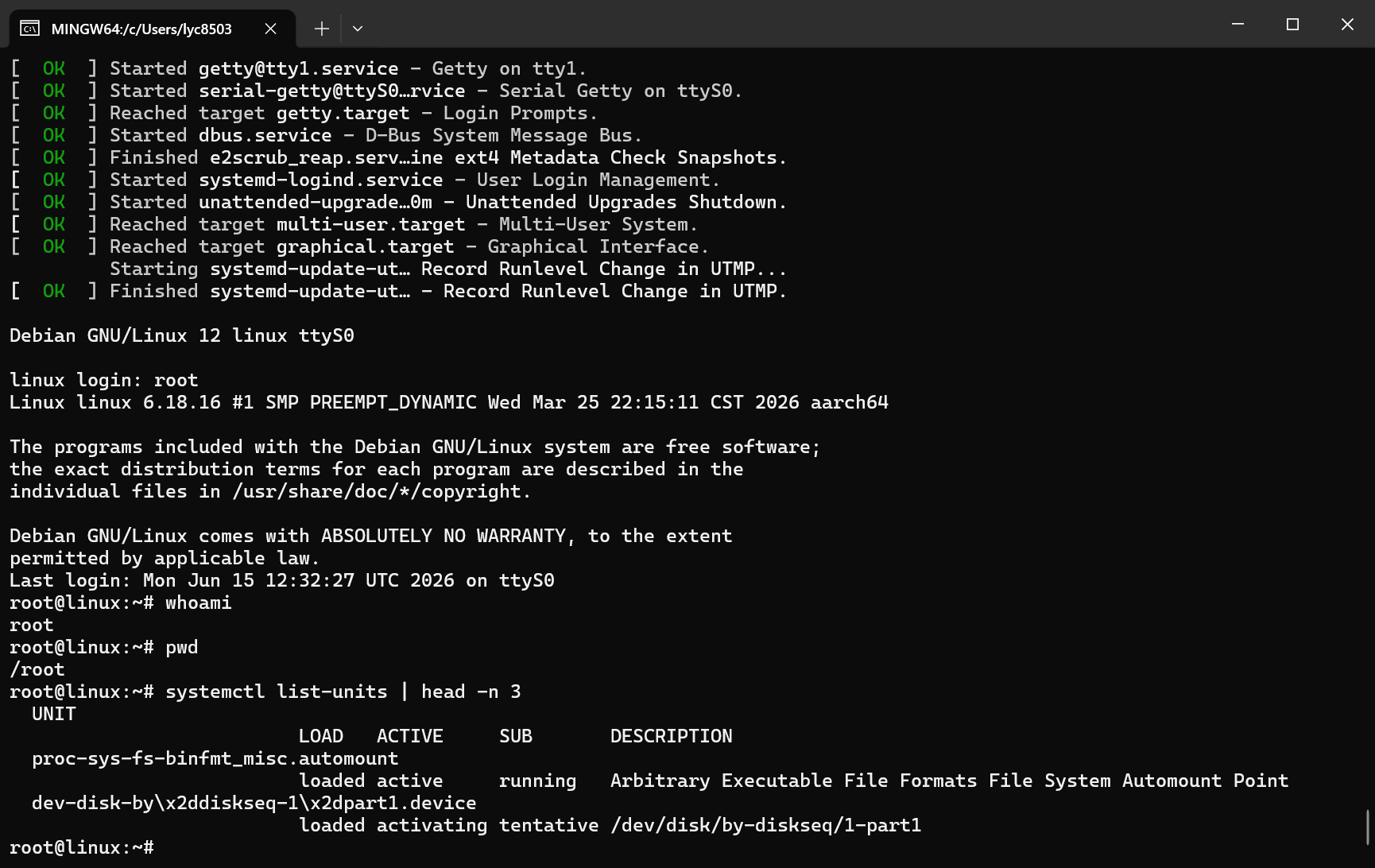 首次成功启动进 Shell
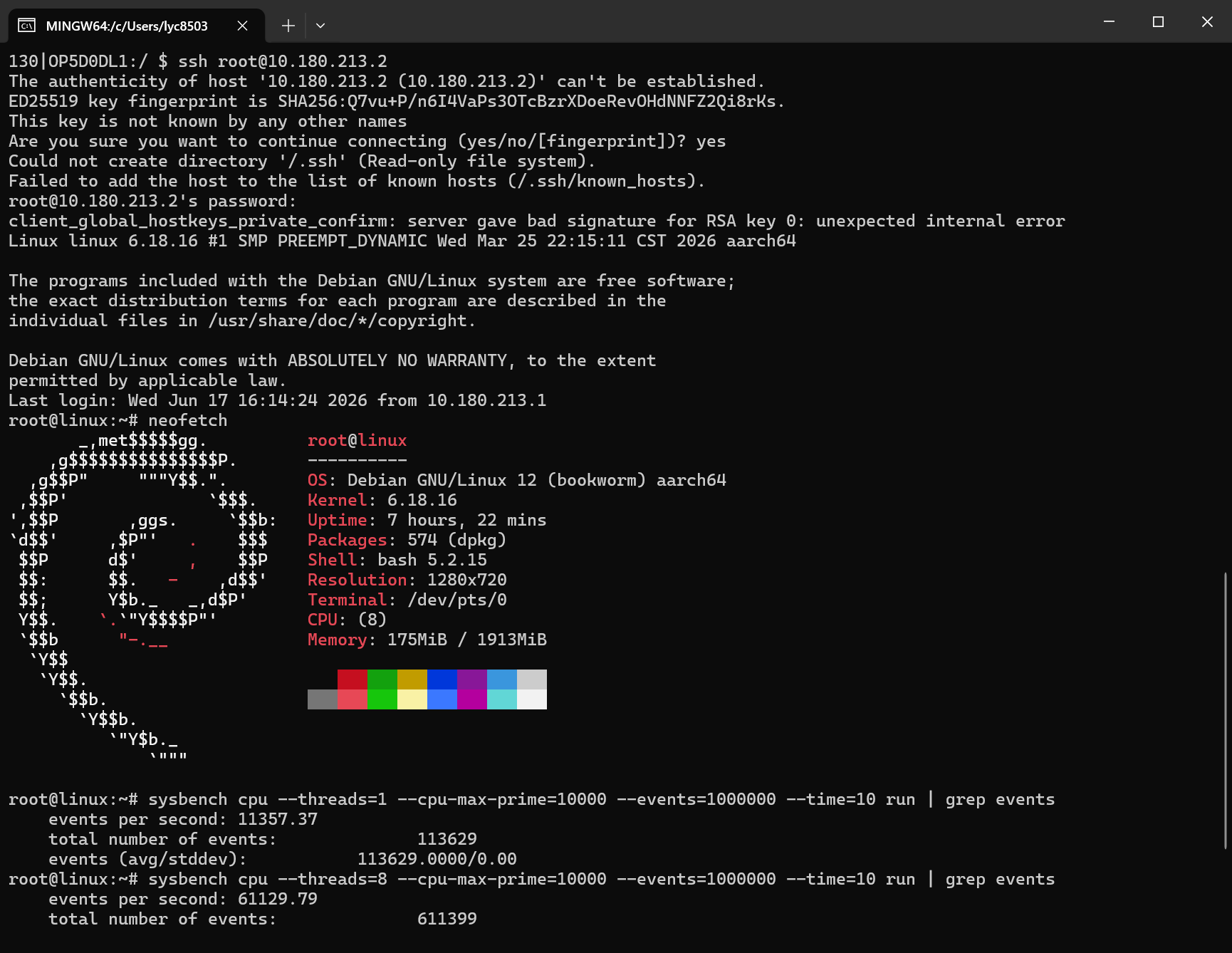 使用 SSH 连接
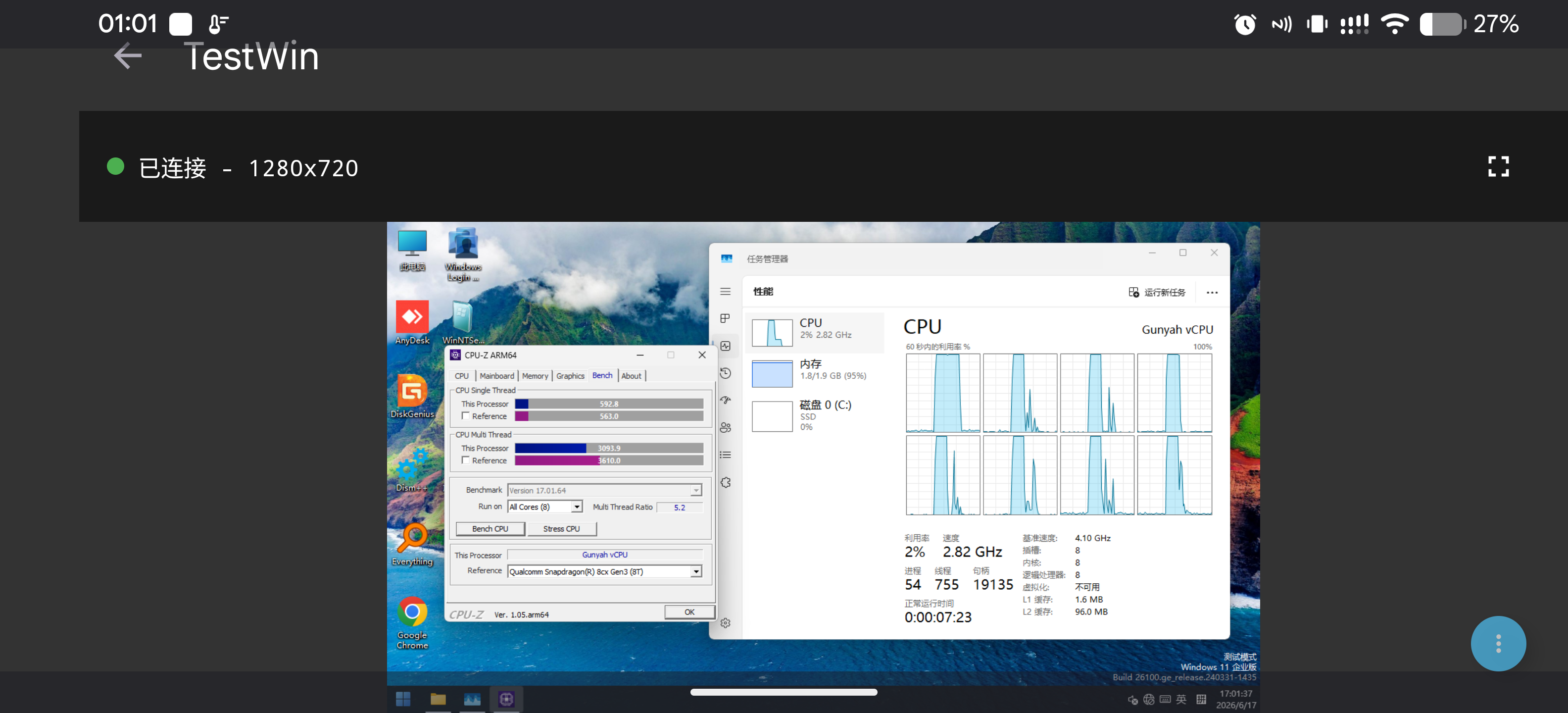 CPU-Z arm64 原生单核 592, 多核 3093 分, 接近 8cx gen3
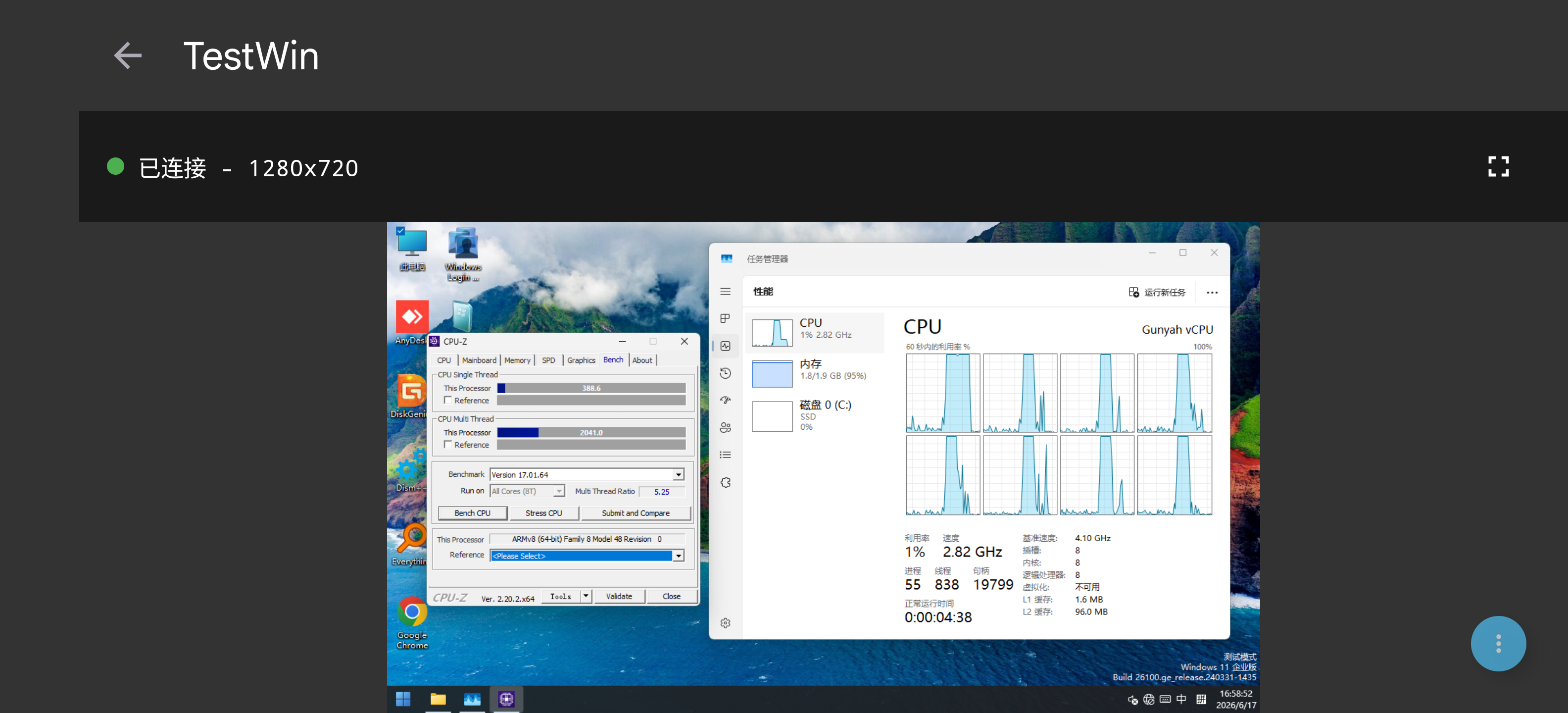 CPU-Z x64 转译单核 388, 多核 2041 分