This article is currently an experimental machine translation and may contain errors. If anything is unclear, please refer to the original Chinese version. I am continuously working to improve the translation.
In 2024, I spent some time exploring how to run Linux and even Windows on Android using KVM virtualization. I compiled resources, did some kernel porting work, and (probably for the first time ever) figured out how to run Windows on ARM on MediaTek SoCs like the Dimensity 1100/1200 that allow access to EL2:
(I recommend reading the above articles first — I cover a lot of background on virtualization there, which I won’t repeat here.)
Now fast forward to 2026. With Google pushing hard, Android 15 devices now require native virtualization support out of the box. Android 16 even ships with a built-in Terminal app capable of running Debian VMs. (Though it also brings the nasty trusted computing — but hey, evil intentions sometimes lead to half-decent outcomes.)
On my OnePlus 13, the Snapdragon 8 Elite CPU and GPU already outclass my laptop (i3-11300H) by a wide margin. It’s a shame to waste all that power just launching QQ, WeChat, and Alipay — China’s infamous trio of bloated apps. Why not put it to better use by running a real VM?
Current State of Virtualization
Let’s take a look at where virtualization stands today. Beyond Google’s Tensor chips with pKVM support, both Qualcomm and MediaTek have now answered the call been forced to add virtualization support in their newer chips.
Qualcomm
Unlike Tensor’s pKVM, Qualcomm introduced Gunyah support starting from the Snapdragon 8 Gen 2. (What the hell is “Gunyah” anyway?)
Gunyah is Qualcomm’s in-house open-source hypervisor, running at EL2 and occupying EL2. It provides necessary interfaces for the EL1 kernel to run trusted VMs. On Linux (Android), it shows up as /dev/gunyah — not the more common and widely supported /dev/kvm.
(As we know from earlier discussions, if EL2 were directly handed to the kernel, the kernel could provide KVM support. So this extra layer clearly exists because the system doesn’t trust the kernel — likely to enable anti-user features like DRM or closed-source on-device LLMs. Thanks, Google, f**k you.)
While Gunyah has technically been supported since 8 Gen 2, early implementations had issues — such as forcing the use of proprietary firmware, requiring workarounds. These were only resolved on 8 Elite and newer devices.
MediaTek
MediaTek, on the other hand, introduced GenieZone starting with the Dimensity 9000 series — similar in concept to Qualcomm’s approach. It’s their own hypervisor running at EL2, exposed as /dev/gzvm.
According to online sources, since GenieZone supports regular (non-memory-protected) VMs, Dimensity 9000 series devices can directly launch Debian VMs via Android 16’s Terminal app. After unlocking the bootloader and rooting, one might even run custom VMs via crosvm. However, I don’t have a device to test this, so I won’t cover GenieZone usage here.
Google’s full lineup of Tensor chips, as mentioned earlier, supports native KVM and pKVM — allowing direct QEMU usage.
As for mysterious in-house chips from other Chinese vendors, due to lack of public documentation and no access to actual devices, their virtualization support remains unknown.
Exploring Gunyah for Running VMs
As of this writing, all released Qualcomm devices (up to the latest 8 Elite Gen 5) only support protected VMs. Even if you install Android 16, the built-in Terminal app won’t show up. If you somehow force it open, you’ll get an error: java.lang.UnsupportedOperationException: Non-protected VMs are not supported on this device.
Gunyah is open-source, but its implementation lives in the hyp partition, which is protected by XBL signature verification on production devices. Modifying it directly leads to a black brick or red-screen boot failure — even with unlocked bootloader (ABL). So unless you’re willing to risk a brick, you’re stuck with the vendor-provided Gunyah firmware.
Looks like we’ll have to dance in chains figure out how to run our own VMs under Gunyah’s memory-protected hypervisor.
Prerequisites
You’ll need a Snapdragon 8 Elite (or newer) device with unlocked bootloader and root access, running Android 15 or higher.
I used a OnePlus 13 running Android 16 (Evolution X 11), kernel version 6.6.126.
First, check if the necessary Gunyah device is available:
1
2
3
OP5D0DL1:/ $ su
OP5D0DL1:/ # ls /dev/gunyah
/dev/gunyah
Crosvm
QEMU doesn’t yet support calling these new Arm hypervisors. So we’re stuck with Google’s crosvm — an open-source VMM.
Android phones already include crosvm at /apex/com.android.virt/bin/crosvm, so this should be straightforward.
Based on Qualcomm’s documentation and crosvm’s help text, it doesn’t look complicated — we should be able to boot Linux using the Linux boot protocol.
Download debian-12-nocloud-arm64.raw from Debian’s cdimage site, and extract the initrd and vmlinuz (Linux kernel) files on a regular Linux machine:
Grab initrd.img-6.1.0-49-arm64 and vmlinuz-6.1.0-49-arm64, then adb push them to /data/local/tmp on your phone. Also copy the debian-12-nocloud-arm64.raw file there.
[2026-06-15T09:00:07.864025329+00:00 DEBUG crosvm::crosvm::sys::linux] creating hypervisor: Gunyah { device: None, qcom_trusted_vm_id: None, qcom_trusted_vm_pas_id: None }
[2026-06-15T09:00:07.866230329+00:00 INFO  crosvm::crosvm::sys::linux::device_helpers] Trying to attach block device: debian-12-nocloud-arm64.raw
[2026-06-15T09:00:07.866881579+00:00 INFO  disk] disk size 3221225472
[    0.000000] Booting Linux on physical CPU 0x0000000000 [0x000f0480]
[    0.000000] Linux version 6.1.0-49-arm64 ([email protected]) (gcc-12 (Debian 12.2.0-14+deb12u1) 12.2.0, GNU ld (GNU Binutils for Debian) 2.40) #1 SMP Debian 6.1.174-1 (2026-05-26)
[    0.000000] random: crng init done
[    0.000000] Machine model: linux,dummy-virt
[    0.000000] efi: UEFI not found.
[    0.000000] NUMA: No NUMA configuration found
[    0.000000] NUMA: Faking a node at [mem 0x0000000080000000-0x00000000bfffffff]
[    0.000000] NUMA: NODE_DATA [mem 0xbbdef380-0xbbdf1fff]
[    0.000000] Zone ranges:
[    0.000000]   DMA      [mem 0x0000000080000000-0x00000000bfffffff]
[    0.000000]   DMA32    empty
[    0.000000]   Normal   empty
[    0.000000] Movable zone start for each node
[    0.000000] Early memory node ranges
[    0.000000]   node   0: [mem 0x0000000080000000-0x00000000bfffffff]
[    0.000000] Initmem setup node 0 [mem 0x0000000080000000-0x00000000bfffffff]
[    0.000000] cma: Reserved 64 MiB at 0x00000000b6c00000
[    0.000000] psci: probing for conduit method from DT.
[    0.000000] psci: PSCIv1.1 detected in firmware.
[    0.000000] psci: Using standard PSCI v0.2 function IDs
[    0.000000] psci: MIGRATE_INFO_TYPE not supported.
[    0.000000] psci: SMC Calling Convention v1.3
[    0.000000] percpu: Embedded 31 pages/cpu s86760 r8192 d32024 u126976
[    0.000000] Detected PIPT I-cache on CPU0
[    0.000000] CPU features: detected: Address authentication (architected QARMA5 algorithm)
[    0.000000] CPU features: detected: GIC system register CPU interface
[    0.000000] CPU features: detected: Hardware dirty bit management
[    0.000000] CPU features: detected: Spectre-v4
[    0.000000] CPU features: detected: Spectre-BHB
[    0.000000] alternatives: applying boot alternatives
[    0.000000] Fallback order for Node 0: 0
[    0.000000] Built 1 zonelists, mobility grouping on.  Total pages: 258048
[    0.000000] Policy zone: DMA
[    0.000000] Kernel command line: panic=-1 console=ttyS0
[    0.000000] Dentry cache hash table entries: 131072 (order: 8, 1048576 bytes, linear)
[    0.000000] Inode-cache hash table entries: 65536 (order: 7, 524288 bytes, linear)
[    0.000000] mem auto-init: stack:all(zero), heap alloc:on, heap free:off
[    0.000000] Memory: 69064K/1048576K available (13248K kernel code, 2804K rwdata, 9504K rodata, 6464K init, 627K bss, 147972K reserved, 65536K cma-reserved)
[    0.000000] SLUB: HWalign=64, Order=0-3, MinObjects=0, CPUs=2, Nodes=1
[    0.000000] ftrace: allocating 44173 entries in 173 pages
[    0.000000] ftrace: allocated 173 pages with 5 groups
[    0.000000] trace event string verifier disabled
[    0.000000] rcu: Hierarchical RCU implementation.
[    0.000000] rcu:     RCU restricting CPUs from NR_CPUS=256 to nr_cpu_ids=2.
[    0.000000]  Rude variant of Tasks RCU enabled.
[    0.000000]  Tracing variant of Tasks RCU enabled.
[    0.000000] rcu: RCU calculated value of scheduler-enlistment delay is 25 jiffies.
[    0.000000] rcu: Adjusting geometry for rcu_fanout_leaf=16, nr_cpu_ids=2
[    0.000000] NR_IRQS: 64, nr_irqs: 64, preallocated irqs: 0
[    0.000000] GICv3: 988 SPIs implemented
[    0.000000] GICv3: 1024 Extended SPIs implemented
[    0.000000] Root IRQ handler: gic_handle_irq
[    0.000000] GICv3: GICv3 features: 16 PPIs, DirectLPI
[    0.000000] GICv3: CPU0: found redistributor 0 region 0:0x000000003ffb0000
[    0.000000] rcu: srcu_init: Setting srcu_struct sizes based on contention.
[    0.000000] arch_timer: cp15 timer(s) running at 19.20MHz (virt).
[    0.000000] clocksource: arch_sys_counter: mask: 0xffffffffffffff max_cycles: 0x46d987e47, max_idle_ns: 440795202767 ns
[    0.000000] sched_clock: 56 bits at 19MHz, resolution 52ns, wraps every 4398046511078ns
[    0.000012] arm-pv: using stolen time PV
[    0.000163] Console: colour dummy device 80x25
[    0.000264] Calibrating delay loop (skipped), value calculated using timer frequency.. 38.40 BogoMIPS (lpj=76800)
[    0.000265] pid_max: default: 32768 minimum: 301
[    0.000346] LSM: Security Framework initializing
[    0.000491] landlock: Up and running.
[    0.000491] Yama: disabled by default; enable with sysctl kernel.yama.*
[    0.000857] AppArmor: AppArmor initialized
[    0.000858] TOMOYO Linux initialized
[    0.000861] LSM support for eBPF active
[    0.001006] Mount-cache hash table entries: 2048 (order: 2, 16384 bytes, linear)
[    0.001103] Mountpoint-cache hash table entries: 2048 (order: 2, 16384 bytes, linear)
[    0.004758] cblist_init_generic: Setting adjustable number of callback queues.
[    0.004758] cblist_init_generic: Setting shift to 1 and lim to 1.
[    0.004857] cblist_init_generic: Setting adjustable number of callback queues.
[    0.004858] cblist_init_generic: Setting shift to 1 and lim to 1.
[    0.005272] rcu: Hierarchical SRCU implementation.
[    0.005272] rcu:     Max phase no-delay instances is 1000.
[    0.008720] EFI services will not be available.
[    0.009280] smp: Bringing up secondary CPUs ...
[    0.010535] Detected PIPT I-cache on CPU1
[    0.010586] GICv3: CPU1: found redistributor 1 region 0:0x000000003ffd0000
[    0.010712] CPU1: Booted secondary processor 0x0000000001 [0x000f0480]
[    0.011185] smp: Brought up 1 node, 2 CPUs
[    0.011187] SMP: Total of 2 processors activated.
[    0.011188] CPU features: detected: Branch Target Identification
[    0.011190] CPU features: detected: Instruction cache invalidation not required for I/D coherence
[    0.011191] CPU features: detected: Data cache clean to the PoU not required for I/D coherence
[    0.011191] CPU features: detected: Common not Private translations
[    0.011191] CPU features: detected: CRC32 instructions
[    0.011192] CPU features: detected: Data cache clean to Point of Deep Persistence
[    0.011192] CPU features: detected: Data cache clean to Point of Persistence
[    0.011192] CPU features: detected: E0PD
[    0.011193] CPU features: detected: Enhanced Counter Virtualization
[    0.011193] CPU features: detected: Enhanced Privileged Access Never
[    0.011194] CPU features: detected: Generic authentication (architected QARMA5 algorithm)
[    0.011194] CPU features: detected: RCpc load-acquire (LDAPR)
[    0.011194] CPU features: detected: LSE atomic instructions
[    0.011195] CPU features: detected: Privileged Access Never
[    0.011195] CPU features: detected: Random Number Generator
[    0.011195] CPU features: detected: Speculation barrier (SB)
[    0.011196] CPU features: detected: TLB range maintenance instructions
[    0.011196] CPU features: detected: Speculative Store Bypassing Safe (SSBS)
[    0.011308] CPU: All CPU(s) started at EL1
[    0.011341] alternatives: applying system-wide alternatives
[    0.084859] node 0 deferred pages initialised in 68ms
[    0.085557] devtmpfs: initialized
[    0.087180] Registered cp15_barrier emulation handler
[    0.087181] setend instruction emulation is not supported on this system
[    0.087353] clocksource: jiffies: mask: 0xffffffff max_cycles: 0xffffffff, max_idle_ns: 7645041785100000 ns
[    0.087502] futex hash table entries: 512 (order: 3, 32768 bytes, linear)
[    0.087806] pinctrl core: initialized pinctrl subsystem
[    0.088338] DMI not present or invalid.
[    0.088837] NET: Registered PF_NETLINK/PF_ROUTE protocol family
[    0.099750] DMA: preallocated 128 KiB GFP_KERNEL pool for atomic allocations
[    0.099829] DMA: preallocated 128 KiB GFP_KERNEL|GFP_DMA pool for atomic allocations
[    0.099900] DMA: preallocated 128 KiB GFP_KERNEL|GFP_DMA32 pool for atomic allocations
[    0.099914] audit: initializing netlink subsys (disabled)
[    0.100205] audit: type=2000 audit(0.092:1): state=initialized audit_enabled=0 res=1
[    0.100635] thermal_sys: Registered thermal governor 'fair_share'
[    0.100636] thermal_sys: Registered thermal governor 'bang_bang'
[    0.100637] thermal_sys: Registered thermal governor 'step_wise'
[    0.100638] thermal_sys: Registered thermal governor 'user_space'
[    0.100638] thermal_sys: Registered thermal governor 'power_allocator'
[    0.100645] cpuidle: using governor ladder
[    0.100647] cpuidle: using governor menu
[    0.100741] hw-breakpoint: found 6 breakpoint and 4 watchpoint registers.
[    0.100855] ASID allocator initialised with 65536 entries
[    0.101295] Serial: AMBA PL011 UART driver
[    0.102526] KASLR enabled
[    0.108613] HugeTLB: registered 1.00 GiB page size, pre-allocated 0 pages
[    0.108615] HugeTLB: 0 KiB vmemmap can be freed for a 1.00 GiB page
[    0.108616] HugeTLB: registered 32.0 MiB page size, pre-allocated 0 pages
[    0.108617] HugeTLB: 0 KiB vmemmap can be freed for a 32.0 MiB page
[    0.108618] HugeTLB: registered 2.00 MiB page size, pre-allocated 0 pages
[    0.108619] HugeTLB: 0 KiB vmemmap can be freed for a 2.00 MiB page
[    0.108619] HugeTLB: registered 64.0 KiB page size, pre-allocated 0 pages
[    0.108620] HugeTLB: 0 KiB vmemmap can be freed for a 64.0 KiB page
[    0.110973] ACPI: Interpreter disabled.
[    0.111321] iommu: Default domain type: Translated
[    0.111323] iommu: DMA domain TLB invalidation policy: strict mode
[    0.111723] pps_core: LinuxPPS API ver. 1 registered
[    0.111724] pps_core: Software ver. 5.3.6 - Copyright 2005-2007 Rodolfo Giometti <[email protected]>
[    0.111728] PTP clock support registered
[    0.111739] EDAC MC: Ver: 3.0.0
[    0.112735] NetLabel: Initializing
[    0.112737] NetLabel:  domain hash size = 128
[    0.112738] NetLabel:  protocols = UNLABELED CIPSOv4 CALIPSO
[    0.112748] NetLabel:  unlabeled traffic allowed by default
[    0.112857] vgaarb: loaded
[    0.113088] clocksource: Switched to clocksource arch_sys_counter
[    0.113924] VFS: Disk quotas dquot_6.6.0
[    0.113956] VFS: Dquot-cache hash table entries: 512 (order 0, 4096 bytes)
[    0.114501] AppArmor: AppArmor Filesystem Enabled
[    0.114510] pnp: PnP ACPI: disabled
[    0.117887] NET: Registered PF_INET protocol family
[    0.118650] IP idents hash table entries: 16384 (order: 5, 131072 bytes, linear)
[    0.119231] tcp_listen_portaddr_hash hash table entries: 512 (order: 1, 8192 bytes, linear)
[    0.120913] Table-perturb hash table entries: 65536 (order: 6, 262144 bytes, linear)
[    0.121264] TCP established hash table entries: 8192 (order: 4, 65536 bytes, linear)
[    0.122650] TCP bind hash table entries: 8192 (order: 6, 262144 bytes, linear)
[    0.122742] TCP: Hash tables configured (established 8192 bind 8192)
[    0.123844] MPTCP token hash table entries: 1024 (order: 3, 24576 bytes, linear)
[    0.123961] UDP hash table entries: 512 (order: 2, 16384 bytes, linear)
[    0.124058] UDP-Lite hash table entries: 512 (order: 2, 16384 bytes, linear)
[    0.124090] NET: Registered PF_UNIX/PF_LOCAL protocol family
[    0.124118] NET: Registered PF_XDP protocol family
[    0.124120] PCI: CLS 0 bytes, default 64
[    0.124672] kvm [1]: HYP mode not available
[    0.133305] Trying to unpack rootfs image as initramfs...
[    0.157310] Initialise system trusted keyrings
[    0.157337] Key type blacklist registered
[    0.157752] workingset: timestamp_bits=42 max_order=18 bucket_order=0
[    0.160068] zbud: loaded
[    0.160383] integrity: Platform Keyring initialized
[    0.160385] integrity: Machine keyring initialized
[    0.160385] Key type asymmetric registered
[    0.160386] Asymmetric key parser 'x509' registered
[    0.935004] Freeing initrd memory: 29256K
[    0.945282] alg: self-tests for CTR-KDF (hmac(sha256)) passed
[    0.945446] Block layer SCSI generic (bsg) driver version 0.4 loaded (major 247)
[    0.945887] io scheduler mq-deadline registered
[    0.946815] shpchp: Standard Hot Plug PCI Controller Driver version: 0.4
[    0.946835] pci-host-generic 10000.pci: host bridge /pci ranges:
[    0.946839] pci-host-generic 10000.pci:      MEM 0x0002000000..0x0003ffffff -> 0x0002000000
[    0.946840] pci-host-generic 10000.pci:      MEM 0x00c0800000..0xffffffffff -> 0x00c0800000
[    0.946842] PCI: OF: PROBE_ONLY enabled
[    0.946847] pci-host-generic 10000.pci: ECAM at [mem 0x00010000-0x0100ffff] for [bus 00]
[    0.946865] pci-host-generic 10000.pci: PCI host bridge to bus 0000:00
[    0.946866] pci_bus 0000:00: root bus resource [bus 00]
[    0.946866] pci_bus 0000:00: root bus resource [mem 0x02000000-0x03ffffff]
[    0.946867] pci_bus 0000:00: root bus resource [mem 0xc0800000-0xffffffffff pref]
[    0.946918] pci 0000:00:00.0: [8086:1237] type 00 class 0x060000
[    0.947281] pci 0000:00:01.0: [1af4:1042] type 00 class 0x018000
[    0.947354] pci 0000:00:01.0: BAR 0 [mem 0x02000000-0x02007fff]
[    0.948106] pci 0000:00:02.0: [1af4:1045] type 00 class 0x088000
[    0.948171] pci 0000:00:02.0: BAR 0 [mem 0x02008000-0x0200ffff]
[    0.948965] pci 0000:00:03.0: [1b36:0011] type 00 class 0xffff00
[    0.949027] pci 0000:00:03.0: BAR 0 [mem 0x02010000-0x0201000f]
[    0.949472] pci 0000:00:00.0: Limiting direct PCI/PCI transfers
[    0.950123] Serial: 8250/16550 driver, 4 ports, IRQ sharing enabled
[    0.950442] printk: console [ttyS0] disabled
[    0.950472] 3f8.U6_16550A: ttyS0 at MMIO 0x3f8 (irq = 13, base_baud = 115200) is a 16550A
[    1.178708] printk: console [ttyS0] enabled
[    1.179620] 2f8.U6_16550A: ttyS1 at MMIO 0x2f8 (irq = 14, base_baud = 115200) is a 16550A
[    1.181239] 3e8.U6_16550A: ttyS2 at MMIO 0x3e8 (irq = 13, base_baud = 115200) is a 16550A
[    1.182800] 2e8.U6_16550A: ttyS3 at MMIO 0x2e8 (irq = 14, base_baud = 115200) is a 16550A
[    1.184316] Serial: AMBA driver
[    1.184921] SuperH (H)SCI(F) driver initialized
[    1.185819] msm_serial: driver initialized
[    1.186945] mousedev: PS/2 mouse device common for all mice
[    1.188346] ledtrig-cpu: registered to indicate activity on CPUs
[    1.189643] SMCCC: SOC_ID: ARCH_SOC_ID not implemented, skipping ....
[    1.221128] NET: Registered PF_INET6 protocol family
[    1.225272] Segment Routing with IPv6
[    1.226136] In-situ OAM (IOAM) with IPv6
[    1.226979] mip6: Mobile IPv6
[    1.227527] NET: Registered PF_PACKET protocol family
[    1.228930] mpls_gso: MPLS GSO support
[    1.230053] registered taskstats version 1
[    1.230926] Loading compiled-in X.509 certificates
[    1.240267] Loaded X.509 cert 'Build time autogenerated kernel key: a6fef1fd8620914aa952f48b963013957a2c4187'
[    1.242988] zswap: loaded using pool lzo/zbud
[    1.244541] Key type .fscrypt registered
[    1.245364] Key type fscrypt-provisioning registered
[    1.250202] Key type encrypted registered
[    1.251037] AppArmor: AppArmor sha1 policy hashing enabled
[    1.252448] ima: No TPM chip found, activating TPM-bypass!
[    1.253723] ima: Allocated hash algorithm: sha256
[    1.254737] ima: No architecture policies found
[    1.255728] evm: Initialising EVM extended attributes:
[    1.256863] evm: security.selinux
[    1.257660] evm: security.SMACK64 (disabled)
[    1.258476] evm: security.SMACK64EXEC (disabled)
[    1.259443] evm: security.SMACK64TRANSMUTE (disabled)
[    1.260732] evm: security.SMACK64MMAP (disabled)
[    1.261787] evm: security.apparmor
[    1.262585] evm: security.ima
[    1.263272] evm: security.capability
[    1.264191] evm: HMAC attrs: 0x1
[    1.305240] clk: Disabling unused clocks
[    1.308351] Freeing unused kernel memory: 6464K
[    1.309723] Checked W+X mappings: passed, no W+X pages found
[    1.310394] Run /init as init process
Loading, please wait...
Starting systemd-udevd version 252.39-1~deb12u2
[    1.366901] virtio_blk virtio0: 2/0/0 default/read/poll queues
[    1.370166] virtio_blk virtio0: [vda] 6291456 512-byte logical blocks (3.22 GB/3.00 GiB)
The log stopped at virtio_blk virtio0: [vda] 6291456 512-byte logical blocks (3.22 GB/3.00 GiB), and the phone entered 900E mode — only fixable via forced reboot.
Is there any way to debug in 900E mode on consumer devices? Probably requires some signed vendor tools I don’t have. Checking /sys/fs/pstore/console-ramoops yielded nothing.
The only useful clue was the crash seemed related to virtio. Given that protected VMs have memory protection — a major difference — I suspected the current virtio implementation wasn’t compatible with pVMs, causing the host to crash. But how to debug that? No idea.
I randomly tried different combinations of boot parameters and distros — no luck. Without block devices, it could boot into initramfs, but mounting a disk caused a black screen. So no way to boot Debian properly.
I dug into the code. At first glance, it used crosvm just like I did — no obvious difference. After comparing for a while, I noticed: it wasn’t using the system’s built-in crosvm, but a self-compiled one.
So I tried installing the DroidVM app and using its crosvm:
Progress! crosvm didn’t crash, and I got actual error logs:
1
2
3
4
5
6
7
8
9
10
(ignoring duplicate logs...)
[    1.381396] Freeing unused kernel memory: 6464K
[    1.383930] Checked W+X mappings: passed, no W+X pages found
[    1.384829] Run /init as init process
Loading, please wait...
Starting systemd-udevd version 252.39-1~deb12u2
[    1.456299] virtio_blk virtio0: 2/0/0 default/read/poll queues
[    1.458012] virtio_blk virtio0: [vda] 6291456 512-byte logical blocks (3.22 GB/3.00 GiB)
[2026-06-15T12:10:36.591592422+00:00 ERROR devices::virtio::queue::split_queue] get_avail_index: host access to lent memory region at 0x97663002 (purpose=GuestMemoryRegion) in protected VM
Timed out for waiting the udev queue being empty.
This version gave a clear error: get_avail_index: host access to lent memory region... in protected VM, instead of crashing the whole phone.
Finally, a human-readable error! And thanks to BigfootACA, the DroidVM author, who answered my question in an issue, I learned that protected VMs require special virtio handling. According to him, the issue is tied to the CONFIG_DMA_RESTRICT_POOL kernel option.
While writing this blog, I realized DroidVM’s crosvm is actually a fork: Droid-VM/crosvm. The very first commit, 39c1337, added the error message that prevents crashes.
Judging from the commit log, this fork includes many additional fixes and features. And the author clearly knows what he’s doing — unlike me, who was just stumbling around. He’s forked crosvm, EDK2, and even Windows guest drivers, doing serious development. Great, now I can just copy homework and finish this blog!
For testing, I confirmed that using the stock Android crosvm with DroidVM’s kernel also works. So the root cause is indeed related to kernel DMA handling:
Running zcat /proc/config.gz | grep CONFIG_DMA_ shows CONFIG_DMA_RESTRICTED_POOL=y in DroidVM’s kernel, while the original image had # CONFIG_DMA_RESTRICTED_POOL is not set.
Memory OOM Issue
Great, now I can just copy homework and finish this blog!
Of course, I soon hit another problem: running Gunyah requires “lending” memory to the encrypted VM. But shortly after boot, Android gets filled with background garbage apps — memory becomes fragmented and tight. Unlike KVM, in pVM mode, allocating more than 1GB to crosvm often leads to vcpu hit unknown error: Out of memory (os error 12) during runtime.
It’s a Magisk module that loads a kernel module at boot, pre-allocating several 2MB hugepages. Using kprobe, it tracks processes that use Gunyah. When such processes call alloc_pages, it returns memory from the pool; on free_pages, it returns memory to the pool.
…Wait, is this even correct? Feels like brute force magic. Clearly, the author had no better options — but hey, it works.
You can control this via DroidVM’s UI or command line:
Now, crosvm runs without crashing due to memory pressure.
Testing
Now it’s time for standard VM tasks: set up TAP devices and NAT, connect to the internet, switch package sources, install SSH and other essentials, resize the disk, etc.
Thanks to the full Debian environment, all of this works exactly like on regular Debian — no extra hurdles.
SSH connection
Ran a sysbench single-core test: 11386 (vs. 270KP’s 4386). Not a fair cross-platform comparison, but at least it shows the 8 Elite’s power is being utilized.
I also tried compiling a Linux kernel to stress-test performance, but the phone got way too hot (SoC hitting 105°C), so I gave up.
Testing Windows
With DroidVM’s UEFI firmware, crosvm can boot Windows. Just replace the vmlinuz in boot args with the prebuilt edk2-gunyah.fd.
The PE image with built-in virtio drivers comes from Coolapk.
Ran a quick benchmark — Android system and apps were probably using some resources, and thermal throttling likely kicked in, but the scores still look decent:
CPU-Z arm64 native: single-core 592, multi-core 3093 — close to 8cx Gen 3
Big thanks to the DroidVM project for making this blog possible — key steps and files came directly from it. While writing, I also forked relevant repos to help readers reproduce the setup.
I manually ran these commands to ensure technical accuracy, but if you just want to get a VM running, DroidVM is the easier choice. It’s actively developed, supports display output over Type-C, GPU passthrough, and many other features I didn’t cover. Definitely worth following. (Though I did run into a few UI bugs — but I trust the author will fix them eventually x)
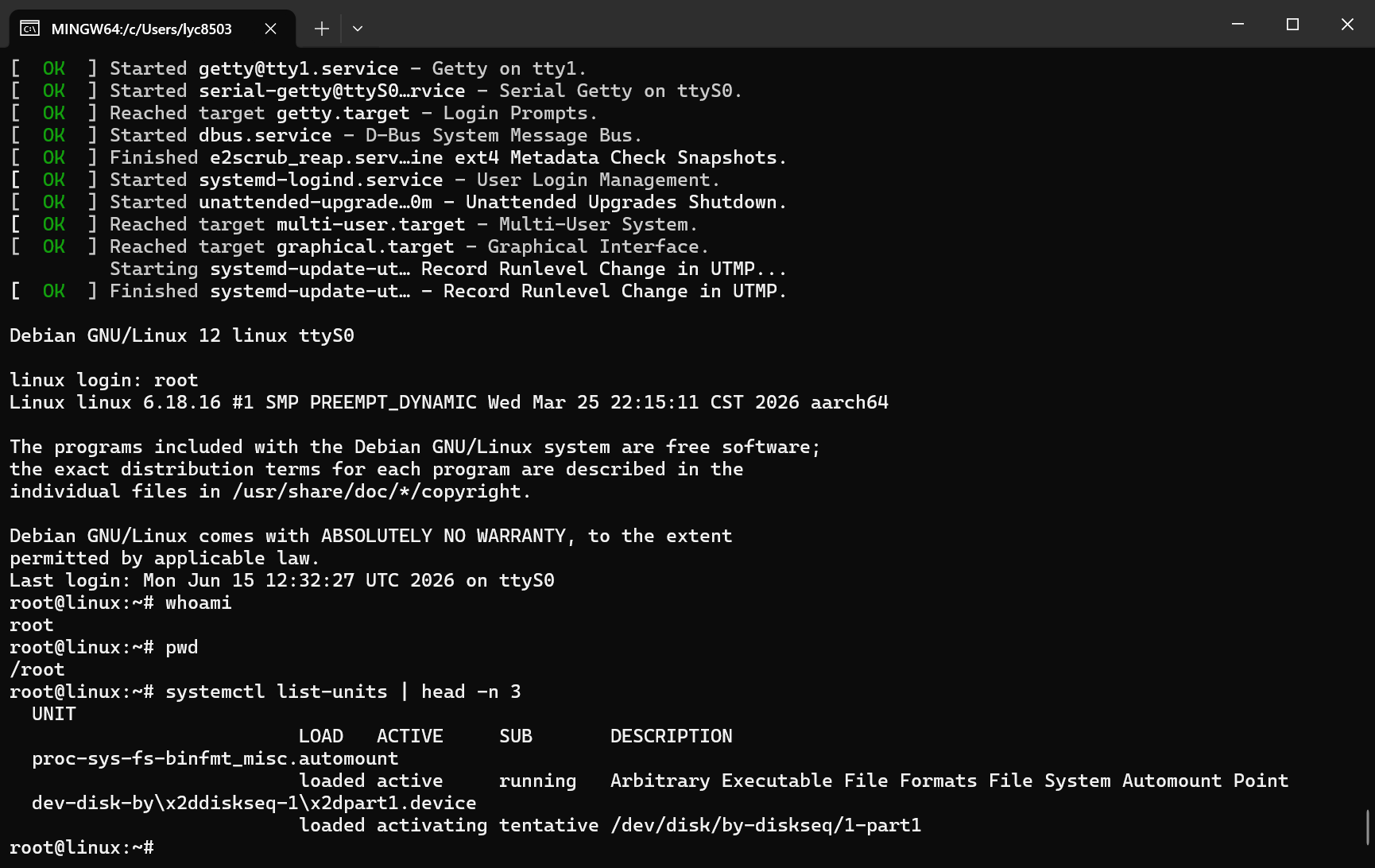 First successful boot into shell
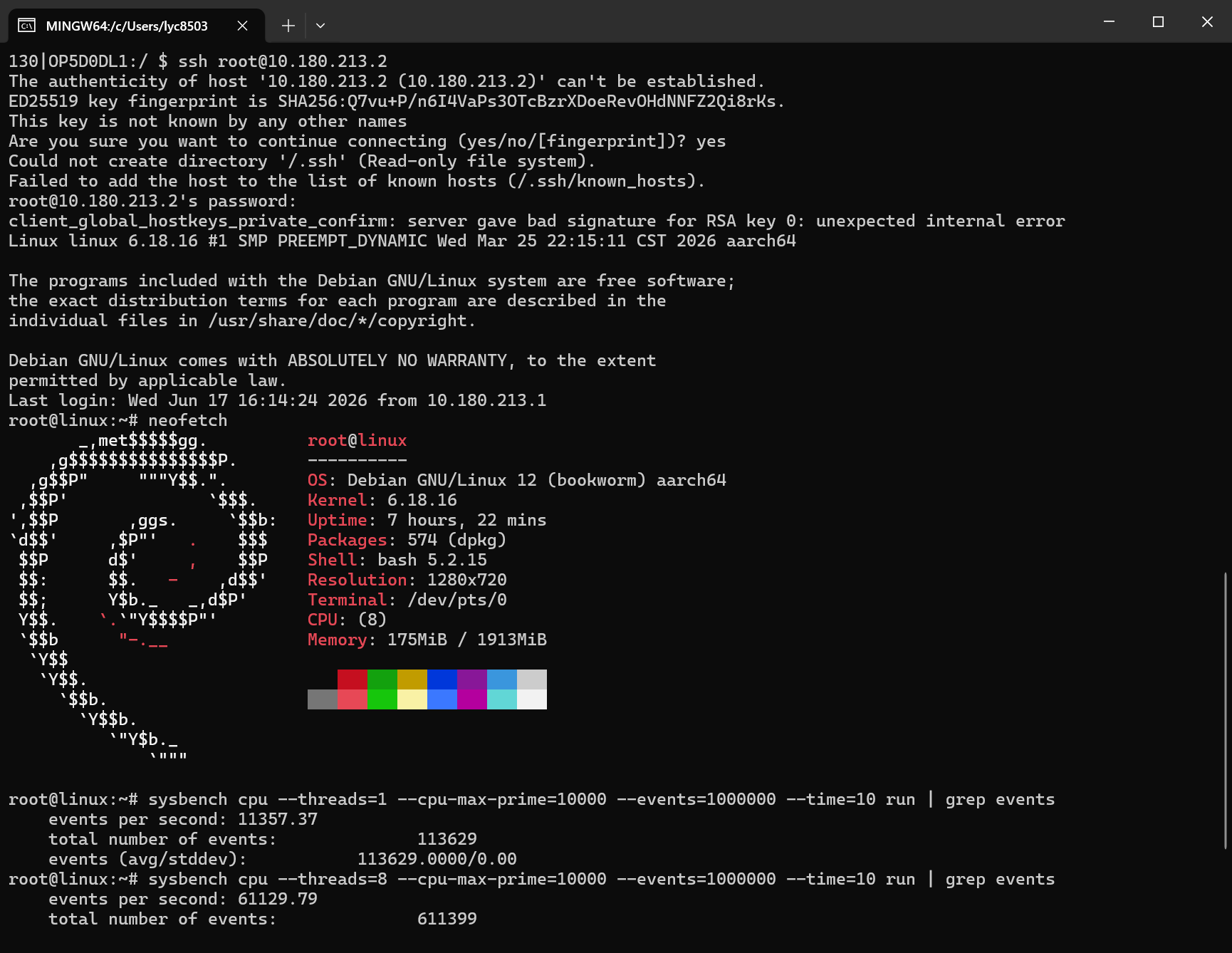 SSH connection
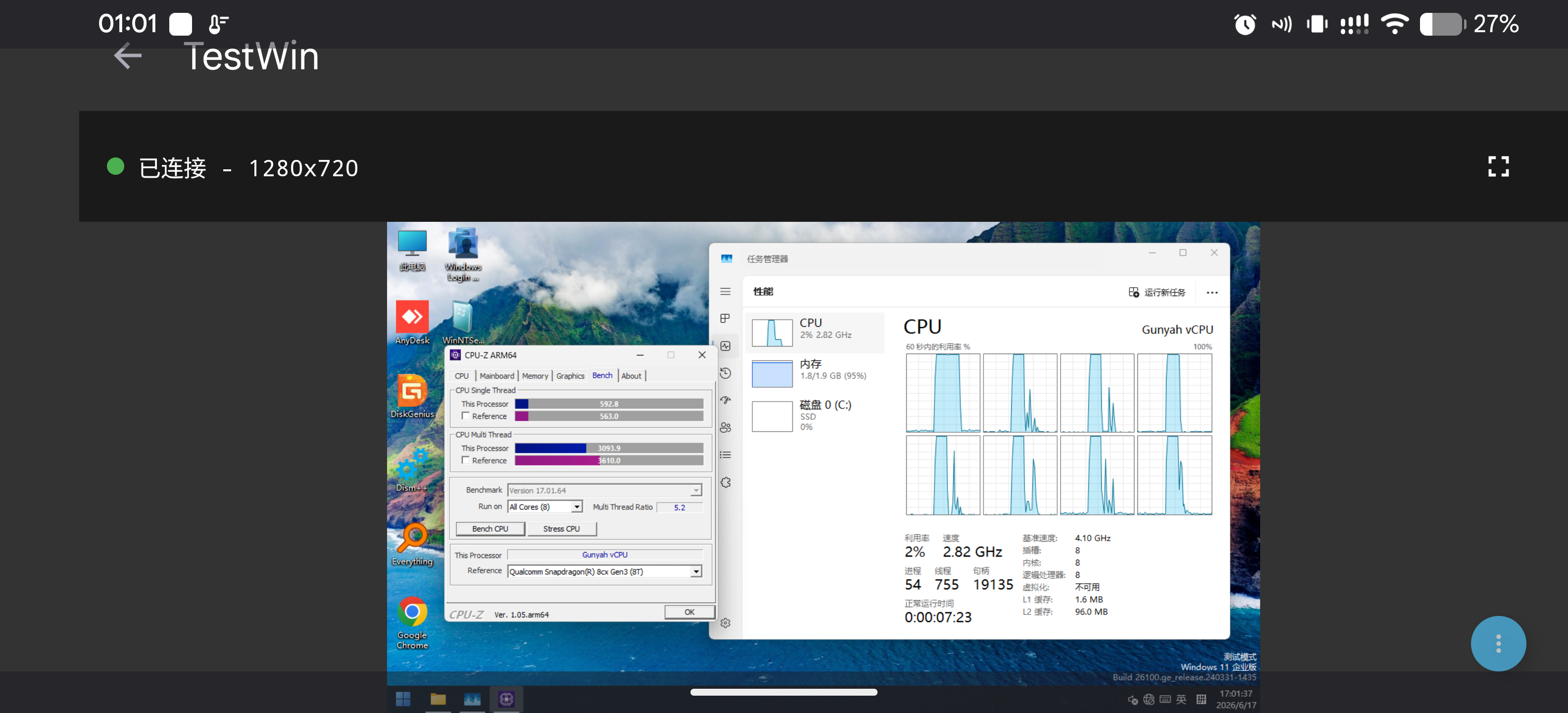 CPU-Z arm64 native: single-core 592, multi-core 3093 — close to 8cx Gen 3
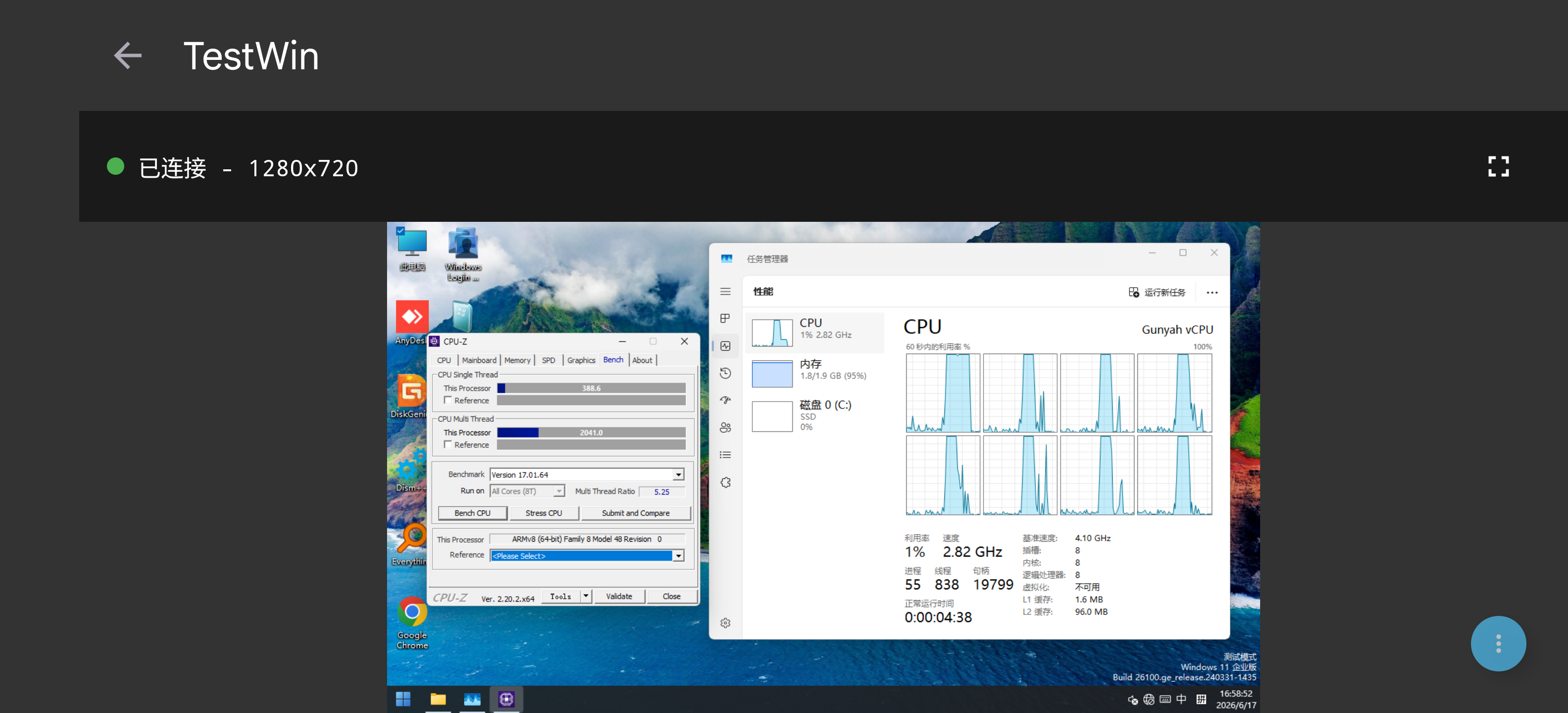 CPU-Z x64 emulation: single-core 388, multi-core 2041