This article is currently an experimental machine translation and may contain errors. If anything is unclear, please refer to the original Chinese version. I am continuously working to improve the translation.
Recently ran out of work, so might as well perform a lighter-biting stunt reverse-engineer some random software for fun. Purely blog content from a water-cooler chat.
Picked a tool heavily discounted and promoted during the AI hype wave—curious if I could extract its API and use it myself.
TL;DR: Vibe Reverse Engineering kinda makes sense?
 Quote from a group mate
Reverse Engineering a Rust Binary
Setting up certificates and packet capturing worked immediately—I could see the API requests. The request body was a JSON, where the message field contained a long base64 string that couldn’t be decoded into anything meaningful. Clearly encrypted.
Tracing back the process responsible for the request, I found the logic lived inside a DLL.
Opened it in IDA Pro—no notable Imports or Exports, but the Strings tab revealed plenty of readable content, including numerous mentions of cargo and crates. Looks like this was a Rust-written DLL.
Great, I haven’t even written proper Rust code and now I’m already doing Rust reverse engineering.
Time to hit the tutorials. jpg
Two hours later: I’m confident I’ve learned Rust—granted, the only thing I’ve written is a Hello World.
Fixing Symbols
From my crash course, I learned Rust is a peculiar language—it lacks a stable ABI, so all dependencies are statically compiled from source. This results in massive binaries, just like Go.
Opening a 100MB binary in IDA Pro took ages. After analysis, it listed over 250,000 functions—all stripped, with zero symbols. Libraries and user code were completely mixed together. On top of that, rustc applies aggressive optimizations, and Rust’s ownership mechanics generate tons of boilerplate code. You might follow a suspicious function only to realize after a long trace that it’s just a library routine, a struct copy, or even a Display trait implementation. This level of messiness deserves a seat at the same table as C++’s chaotic class pointer jungle.
I first tried brute-forcing it—set breakpoints at the API call site and traced up the stack. But the trail died once I hit tokio’s async logic. Eventually decided to invest time in fixing symbols.
First attempt: I used the third-party Lumina server via https://abda.nl/lumen/. No luck—both IDA Pro 7.x and 9.x hung during the request. I suspect either the massive binary choked the server, or the server itself was having issues.
Then I tried other tools designed for Rust symbol recovery, like rustbinsign and Cerberus, among others.
Their general idea: identify the libraries and toolchain version used in the binary, recompile them, match symbols to assembly signatures, then import into IDA.
Cerberus didn’t work for me. rustbinsign ran for half a day with default settings and recovered only about 10% of the symbols. It recommends using --full-compilation for better results, but that requires cloning and building entire git repos. The dependency tree pulled down over 150GB before I gave up—ran out of disk space and Windows setup was too much hassle. Might revisit this for future Rust targets.
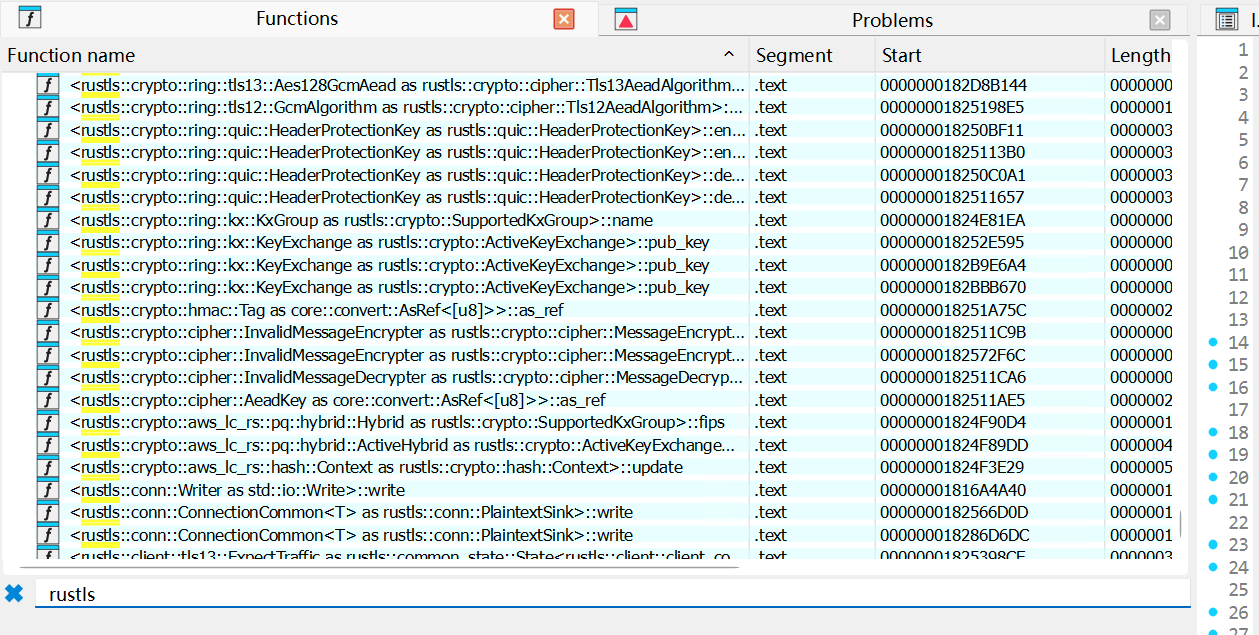 At least some important symbols were recovered
A Few Other Plugins
- findcrypt: Still a solid tool for spotting AES/Base64/RSA entry points
- IDARustHelper: Helps identify Rust-specific string structures
Vibe Reverse Engineering
Alright, I had some symbols now, but debugging breakpoints weren’t hitting. Still stuck manually tracing through layers… Requires insane focus…
Wait a second—focus? Why not let the model that’s best at attention do the reversing for me? That’s when I found:
After installing, I integrated MCP into VS Code so Copilot could call it directly.
I tested four models:Gemini-3-Pro-Preview / GPT-5.2-Codex / Claude Sonnet 4.5 / Claude Opus 4.5
The prompt didn’t need to be fancy—straightforward worked best:
1 | Help me use IDA Pro MCP to analyze how this AI-related program encrypts the request string. Focus on calls related to xxx/yyy. |
Here, xxx/yyy can be the actual API endpoint. In practice, though, giving the model intermediate findings or suspicious points I’d already identified improved results significantly—keeps the model from going off the rails.
Sometimes the model would get lazy and stop halfway. When that happened, I’d manually review the output. If it was completely off track, I’d restart the session. If it was still in the ballpark, I’d keep guiding it.
Providing the model with ways to verify and iterate on its findings was crucial (saved me tons of manual validation):
1 | req.txt is an actual captured request. Try decrypting it using your findings. |
And to keep it honest:
1 | Carefully analyze using IDA Pro, trace the call chain, and confirm your previous findings—don’t guess or brute-force. |
In my testing:Gemini-3-Pro-Preview started looping or hallucinating badly in long contexts.Claude Sonnet 4.5 refused to actively use MCP no matter how I prompted—it made a few calls then started fabricating results.
GPT-5.2-Codex was extremely proactive. After resetting the conversation a few times and trying different entry points, it was the first to correctly identify the encryption algorithm and even provided working Python decryption code.
Full conversation log with successful decryption—data sanitized
Claude Opus 4.5 was much more cooperative than the lazy Sonnet. It quickly zeroed in on the core encryption method, explained its reasoning as it used tools, and felt more logically structured. But unlike GPT-5.2’s hyper-focused (if erratic) attention, it somehow missed a few critical parameters hidden in the HTTP headers, got stuck in a loop, and ran out of context before completing the decryption.
Since Opus is more expensive, I didn’t retry extensively. But I believe with a few more attempts, it could’ve succeeded too.
Retrospective
Final verdict: the app used a hard-coded key, XOR-obfuscated three times, then applied standard AES-256-GCM to encrypt the request body. Before each request, it XORed additional random bytes into the key and sent those bytes along with the request. The nonce was simply prepended to the ciphertext.
Nothing fancy—actually quite simple. The only real challenge was patiently untangling the logic buried deep in verbose Rust decompiled output. Reverse engineering the rest of the API was just behavioral observation—nothing worth detailing.
Looking back at the AI analysis: I could’ve found the same result manually. I’d already used findcrypt to locate Base64 patterns and traced back two cross-references. The logic I needed was just two xrefs further. With debugging, I could’ve easily extracted the de-obfuscated key—probably faster than static analysis.
Still, the LLM definitely helped speed things up. What might’ve taken half a day was done in about two hours with AI assistance. More importantly, I saved myself from staring at disassembly for hours. Much less grind.
One last note: I don’t buy into the “AI does everything” Vibe XXX fantasy. In my experience, humans still need to do their homework—gather target info, fix structures/symbols, perform initial analysis—and while the LLM works, provide proper prompts, supervision, and guidance. Use AI to offload grunt work, not critical thinking. That’s how you get the best results.
This article is licensed under the CC BY-NC-SA 4.0 license.
Author: lyc8503, Article link: https://blog.lyc8503.net/en/post/rust-and-vibe-reverse-engineering/
If this article was helpful or interesting to you, consider buy me a coffee¬_¬
Feel free to comment in English below o/