This article is currently an experimental machine translation and may contain errors. If anything is unclear, please refer to the original Chinese version. I am continuously working to improve the translation.
Introduction
AS & BGP
In computer networking courses, we learn that today’s Internet is essentially a collection of interconnected Autonomous Systems (AS) using the Border Gateway Protocol (BGP). Each AS has a unique number called an ASN (Autonomous System Number). Each AS contains certain IP address blocks, and for an IP address to be reachable on the Internet, it must be announced from within an AS.
For example, Nanjing University may assign public IP addresses from the 114.212.0.0/16 block to parts of its campus network. A lookup on IPinfo shows this IP range belongs to AS4538 China Education and Research Network Center.
Unexpected Discovery
Until recently, I hadn’t looked deeper into this topic. All my IP addresses came either from my ISP (home broadband) or cloud providers (Alibaba Cloud, GCP, Azure, etc.).
My impression of IP addresses and ASNs was that they were expensive, difficult to obtain, and not friendly to individuals.
But while browsing the web recently, I discovered that applying for an ASN and IP blocks as an individual is actually quite affordable and straightforward. There’s even an active community of hobbyists doing this.
That inspired me to start this series, documenting my experiments with a personal ASN.
Registration Process
The organizations directly responsible for managing IP address and ASN allocations are the Regional Internet Registries (RIRs). RIRs are coordinated by IANA, which in turn is managed by ICANN. (It’s a bit of a mess.)
According to Wikipedia, there are five RIRs: ARIN, RIPE NCC, APNIC, LACNIC, and AfriNIC. Based on online resources, RIPE NCC is currently the most individual-friendly, followed by ARIN and APNIC. The following steps are based on RIPE NCC, though processes may vary slightly for other RIRs.
Choosing an LIR
To apply directly to RIPE NCC, you must first become a RIPE NCC member, which costs €1,550 per year. That’s clearly too expensive for most individuals. However, RIPE NCC allows its members to sponsor resource applications for others. These members are known as Local Internet Registries (LIRs). Instead of joining RIPE NCC yourself, you can find an existing LIR to sponsor your ASN and IP block applications.
So the first step is to find a reliable LIR. You can search Google for “LIR Services”.
Currently, RIPE NCC charges €50/year for PI (Provider Independent) resources. This means the LIR must pay RIPE NCC at least €50 annually, so you’ll need to pay the LIR at least €50/year plus their service fee. Exact pricing varies—check with your chosen LIR.
For this, I picked Infiniroute, one of the cheaper options I found on NodeSeek. (UPDATE: Don’t follow my lead—they’ve vanished, RIP)
There’s also a list of LIRs on LowEndTalk, though prices may be outdated. Still, it’s a good reference: https://lowendtalk.com/discussion/160162/the-aio-ip-related-thread-ipv4-ipv6-asn-only-providers-are-allowed-to-post-offers-2
Preparing Documentation
TL;DR: You’ll need at least the following:
- A personal ID or company registration document (you’ll later verify your ID via iDenfy)
- A recent invoice from a European BGP-enabled hosting provider (just buy a VPS from BuyVM or Vultr)
- A contact email and mailing address (email is important for verification; address probably doesn’t matter much)
- Two upstream ASNs (you can pick any European BGP-supporting providers; one should match the invoice you provide)
Some LIRs offer full-service packages: they guide you through each step, fill out forms, and even bundle BGP sessions as upstream transit. Others only act as sponsors and expect you to complete the registration yourself. I chose Infiniroute, which falls into the latter category.
If your LIR doesn’t handle setup, follow this guide to register your own account and submit data: https://lir.zhnet.co.uk/asn-setup-zhcn
Even if your LIR handles everything, it’s worth reviewing the link above to get familiar with RIPE NCC Access. The RIPE Database contains various object types—maintainers, ASNs, IP allocations, etc. For now, follow the guide to create the role, maintainer (mntner), and organisation objects, so your LIR can sponsor your ASN later.
Payment & Waiting
Your LIR should guide you through the remaining steps. They might even give you a free IPv6 block. If not, purchasing IPv6 is cheap(unlike IPv4, which is pricey). The registration process usually takes 3–5 days. Once complete, log in to RIPE NCC Access to see your resources. (The LIR will have created an aut-num object for your ASN and an inet6num object for your IPv6 block.)
You can now manage your ASN and IPv6 block directly via RIPE NCC Access: https://apps.db.ripe.net/db-web-ui/myresources/overview
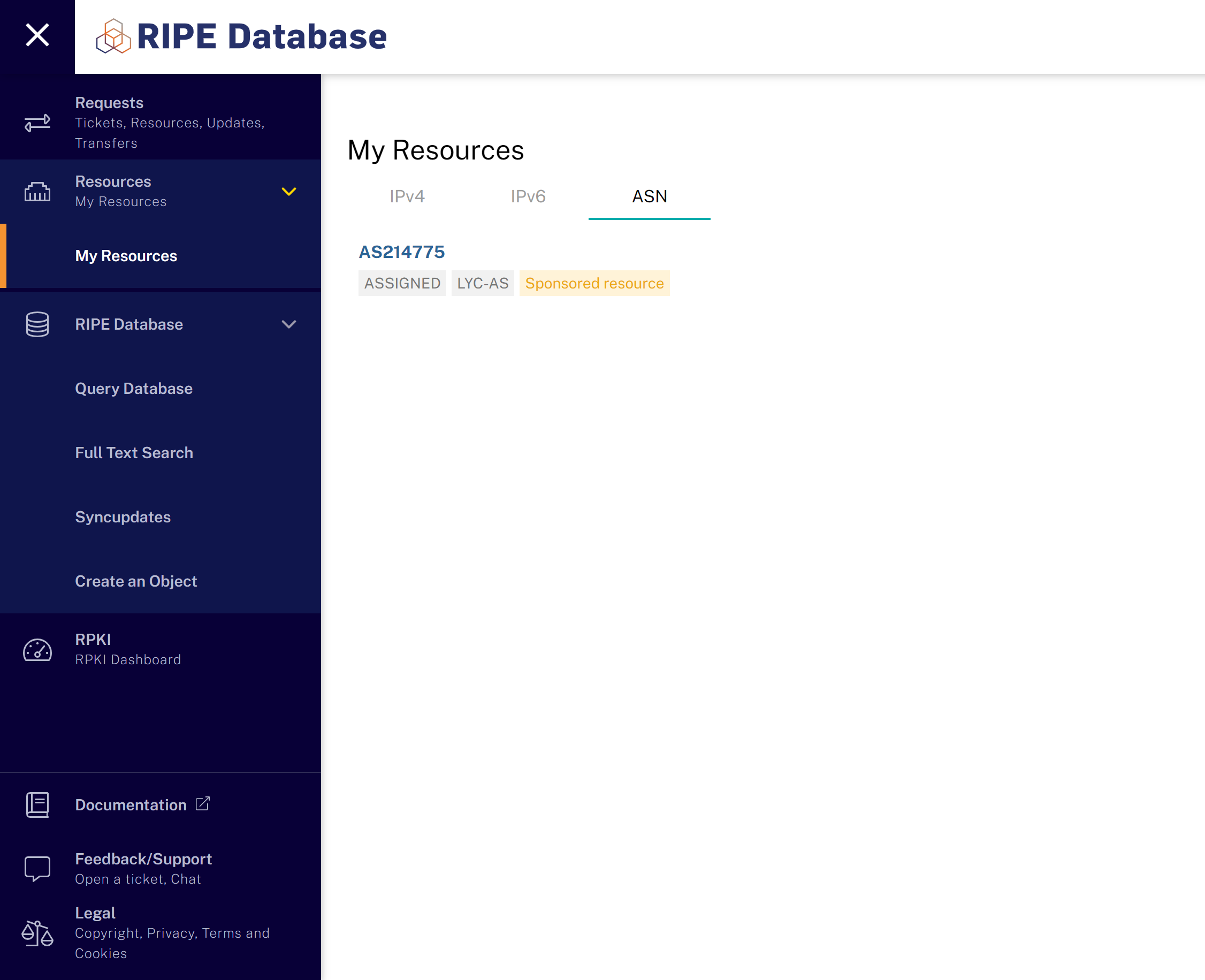 Managing your resources in RIPE NCC Access
RPKI
After getting your ASN and IP block, there’s one more step: setting up RPKI and ROA.
For what RPKI is, check out this Cloudflare article. In short, RPKI (Resource Public Key Infrastructure) uses certificates to verify IP address ownership.
You need to create a ROA (Route Origin Authorization) to authorize your AS to announce your IP block.
Some upstream providers now require RPKI validation, so it’s best to set this up early to avoid issues later.
Your IP resources can be PA (Provider Aggregatable) or PI (Provider Independent). Blocks provided by your LIR (either free or purchased) are usually PA.PI costs extra and is more expensive. To modify RPKI for PA resources, just contact your LIR.
Simply message them: “Please add a ROA for IP block xxx with ASxxxx,” and they should set it up for you.
If you later have multiple ASNs or IP blocks and need to update ROAs, just contact your LIR again.
route6
Similar to RPKI, the route6 object links your AS to your IPv6 block. Some upstreams require this. You need to create it yourself in the RIPE Database.
Log into the RIPE Database, click Create an Object, choose type route6, and fill in your AS and IPv6 block.
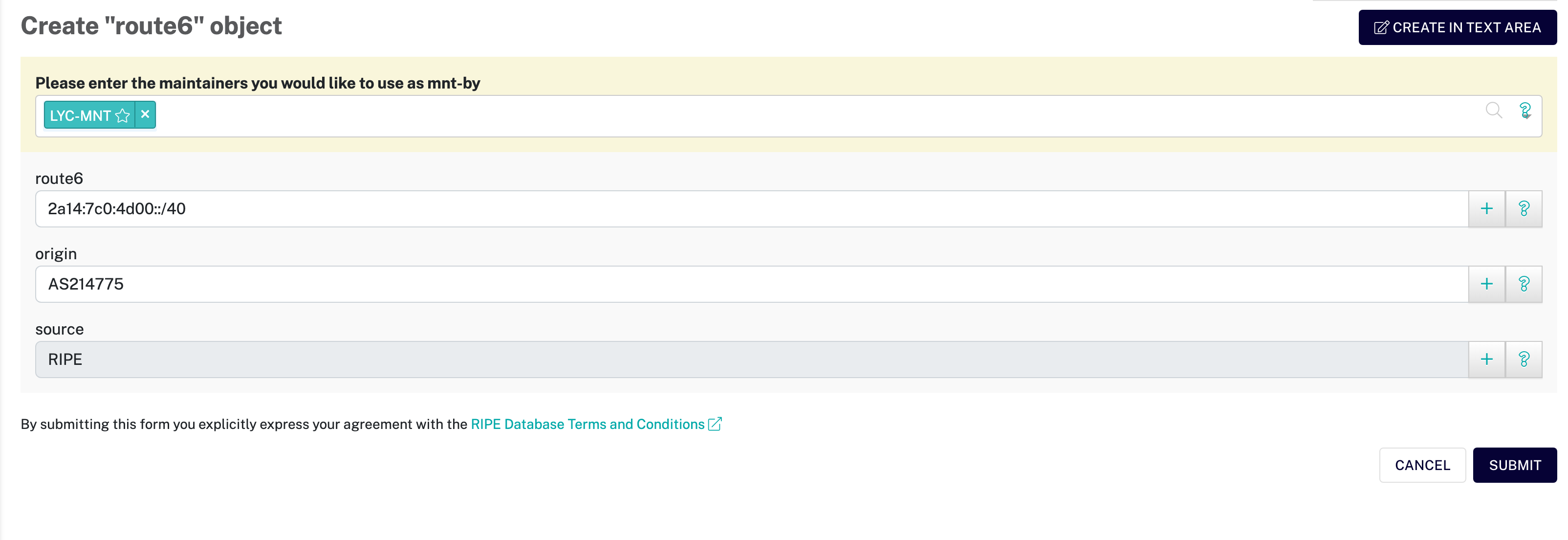 Creating the required route6 object
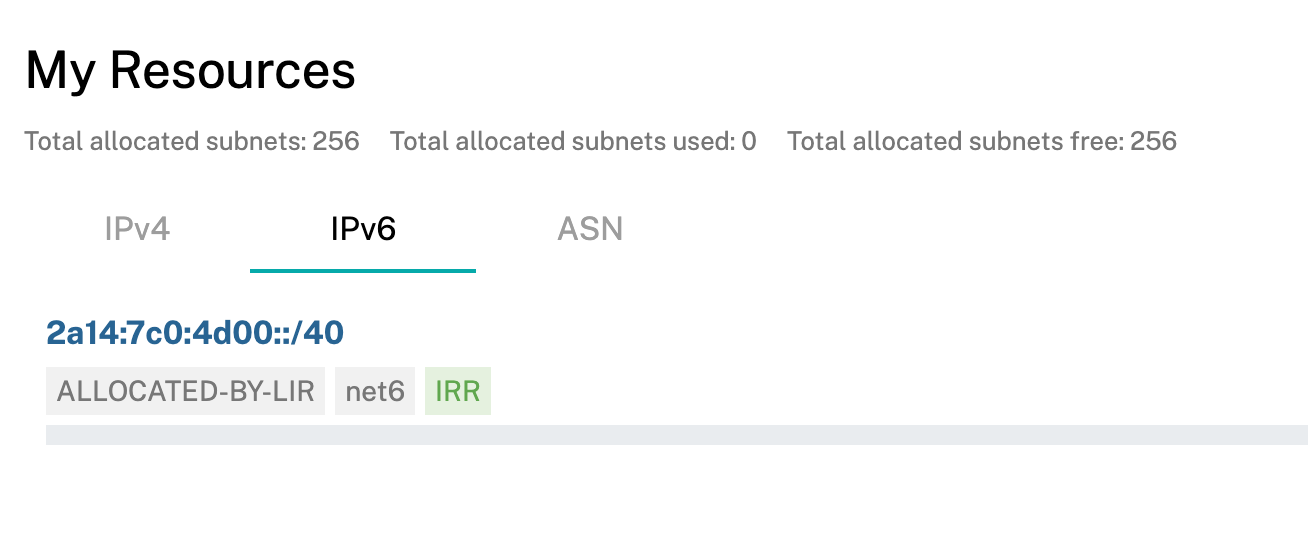 After creation, you’ll see a green IRR label next to your IPv6 resource
Summary
Step one of a long journey—completed
If the RIPE Database still looks overwhelming, refer to the official documentation.
Stay tuned for the next chapter!
This article is licensed under the CC BY-NC-SA 4.0 license.
Author: lyc8503, Article link: https://blog.lyc8503.net/en/post/asn-1-asn-registration/
If this article was helpful or interesting to you, consider buy me a coffee¬_¬
Feel free to comment in English below o/