This article is currently an experimental machine translation and may contain errors. If anything is unclear, please refer to the original Chinese version. I am continuously working to improve the translation.
A summary of web scraping strategies and common anti-scraping countermeasures.
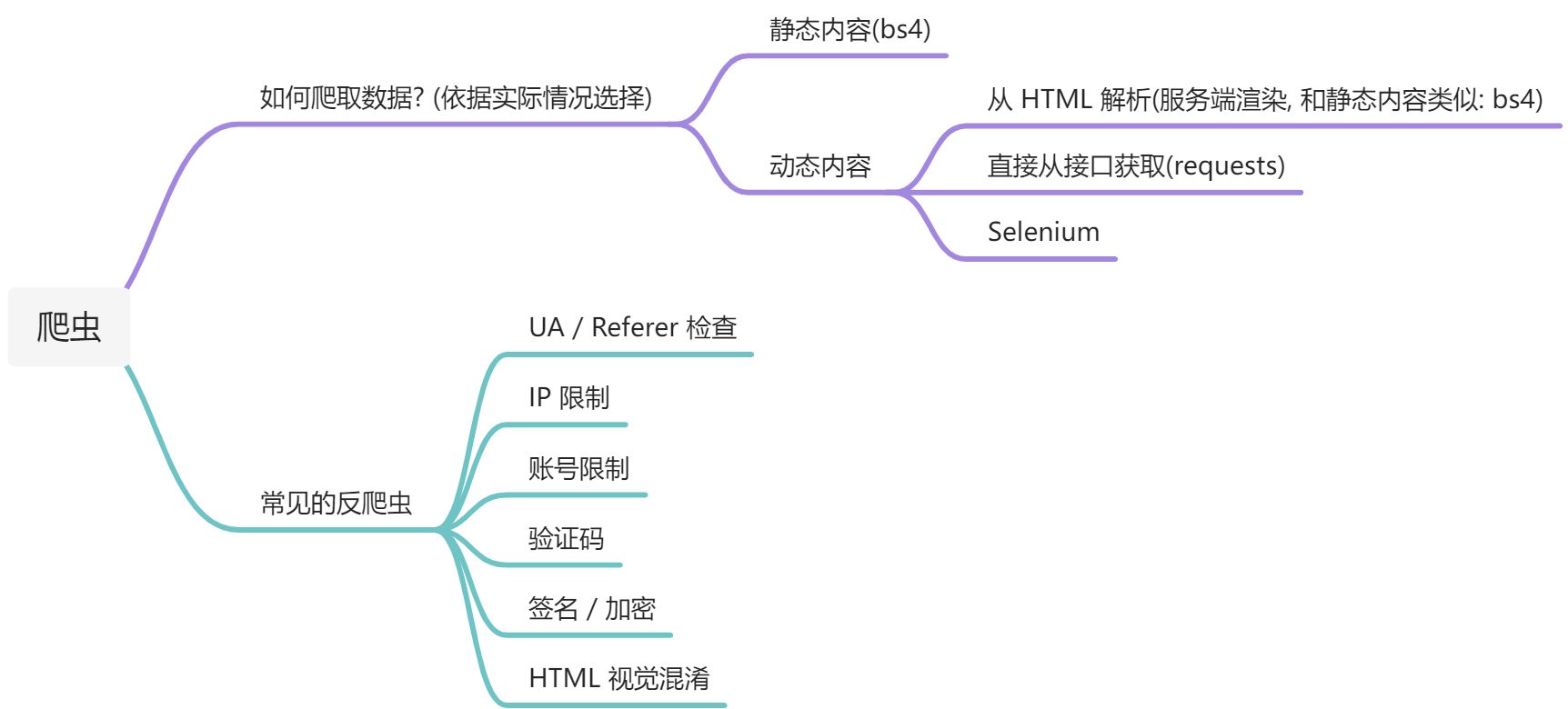 Mind Map
Prerequisites for Web Scraping
- Basic Python syntax (Python has powerful and well-developed scraping libraries)
- Knowledge of HTTP (learn how to capture network traffic and understand HTTP requests/responses)
- Basic HTML and CSS (understand HTML structure and parse web content)
- Understanding of JSON and XML formats (parse API responses)
Quick learning resource: https://www.runoob.com/
Optional skills include:
- Regular expressions (for data extraction)
- JavaScript (to understand dynamic content and reverse engineer encryption)
- Android knowledge (reverse engineering app encryption)
- Computer Vision (CV) (for CAPTCHA recognition)
- SQL (for storing large volumes of scraped data)
- Linux (for running scrapers on servers over long periods)
- etc.
Fetching and Parsing Data
- Construct and send requests to the server
Construct appropriate HTTP requests by analyzing page content or capturing traffic, then send them.
Recommended traffic capture tool: Fiddler https://www.telerik.com/fiddler/fiddler-classic
Recommended Python HTTP library: requests https://docs.python-requests.org/en/latest/
1 | # Example: Google search with keyword |
- Parse the response content (specific approach depends on the website’s design)
For content directly embedded in HTML:
Use beautifulsoup4 to parse HTML.
https://beautifulsoup.readthedocs.io/zh_CN/v4.4.0/
1 | # Example: Baidu Baike search result |
For data returned via API:
Directly use the .json() method of the requests object or json.loads() to parse the response.
1 | # Example: NetEase Cloud Music search API |
Common Anti-Scraping Techniques and Countermeasures
User-Agent / Referer Checks
User-Agent and Referer in HTTP headers can be used to detect bots.
If you immediately get a 403 error when accessing a site, it might be due to UA detection.
The fix is simple: modify the UA and Referer in the headers of your requests.
1 | requests.get("https://www.example.com/", |
IP Rate Limiting
Repeated access from the same IP in a short time may trigger anti-bot systems.
Solution: use proxies to hide your real IP. When scraping large amounts of data, rotate through multiple IPs.
1 | requests.get("https://www.example.com/", proxies={"https": "http://x.x.x.x:1080"}) |
You can purchase proxy pool services online, such as https://www.abuyun.com/ or https://http.zhimaruanjian.com/.
I’ve also found a cheaper and stable source of IPs—using Tencent Cloud Functions as a relay to obtain multiple IPs. Details here: https://blog.lyc8503.net/post/sfc-proxy-pool/
Account Rate Limiting
When accessing data that requires login, using the same account’s cookie repeatedly in a short time may also be flagged.
Solutions: register multiple accounts, save their cookies, and rotate usage. Alternatively, look for non-login data sources.
CAPTCHA
Solutions:
Simple CAPTCHAs can be preprocessed and then recognized using OCR.
Slider CAPTCHAs can be solved using CV to detect the gap and simulate dragging.
1
2
3
4
5
6# Example: Using OpenCV to bypass Tencent's slider CAPTCHA
target = cv2.cvtColor(target, cv2.COLOR_BGR2GRAY)
target = abs(255 - target)
result = cv2.matchTemplate(target, template, cv2.TM_CCOEFF_NORMED)
x, y = np.unravel_index(result.argmax(), result.shape)
return x, yUltimate solution: use human-powered CAPTCHA-solving services.
JavaScript Encryption
Some websites add a “signature” (e.g., a sign parameter) to requests or encrypt responses.
The JavaScript code responsible is often heavily obfuscated.
Solutions:
- Use selenium to run a full browser. Easy to implement but slow, resource-heavy. Suitable for small-scale scraping.
- Use PyExecJS or similar to run the encryption JavaScript directly in Python. Good performance and moderate complexity, but environment setup can be tricky. Not ideal for heavily obfuscated or unextractable JS.
- Manually analyze the JS and rewrite the encryption logic in Python. Best performance and clarity, but requires JavaScript knowledge and is time-consuming.
Recommended tools: selenium / Chrome DevTools
Mobile App Encryption
Many websites have companion Android/iOS apps, which may have weaker anti-scraping measures than their web counterparts.
When the web version is hard to scrape, try accessing data via the app’s API.
Recommended mobile traffic capture tools: Fiddler (requires PC) or HttpCanary https://apkpure.com/httpcanary-%E2%80%94-http-sniffer-capture-analysis/com.guoshi.httpcanary
Note: App requests may also include signatures or encryption, requiring reverse engineering.
Recommended Android tools:
- Unpacking: Reflection Master (Fansi Dashi)
- APK decompiler: jadx
- Native code analysis: IDA Pro
There’s also appium, similar to selenium, but it’s cumbersome—not recommended.
HTML Obfuscation
Various techniques exist and can be complex, though not very common. Examples:
- Custom fonts: server returns garbled text, which appears normal when rendered with a specific font in the browser.
- CSS repositioning: actual data is “321” but displayed as “123” by rearranging elements via CSS.
- Splitting images into multiple pieces (“puzzle”) and reassembling them on the client side.
Practical Examples
Weibo Scraper
After capturing traffic, we find Weibo’s search request is simple:https://s.weibo.com/weibo?q={keyword}&page={i}
The response is plain HTML (not dynamically loaded), so parsing with bs4 is sufficient. weibo
weibo
1 | soup = BeautifulSoup(r.text, "html.parser") |
Nanjing University Health Check-in Automation
Use HttpCanary to capture mobile app traffic. NJU
NJU
1 | r = session.get('https://ehallapp.nju.edu.cn/xgfw/sys/yqfxmrjkdkappnju/apply/getApplyInfoList.do') |
Scraping QQ Zone Status Updates
- Use Chrome DevTools to capture requests.
 Qzone
Qzone
We find a mysterious g_tk parameter—without it, the API returns nothing. Other parameters are understandable.
By tracing the source code and searching for g_tk, we find it’s generated by this function:
1 | // Unimportant parts omitted |
We can directly rewrite this in Python:
1 | def get_gtk(login_cookie): |
After constructing the request with g_tk, the server returns data in JSONP format, which can be parsed directly.
- Automatic Login and Cookie Retrieval
The web version of QQ Zone cookies expire quickly. For long-term scraping, we need automatic login.
Since login logic is rarely called and complex to reverse, we use selenium.
Key issues to handle:
- Login is in a separate iframe—remember to
switch_to.frame('login_frame')in code. - Tencent’s slider CAPTCHA.
 Slide
Slide
Solving the slider CAPTCHA using CV:
1 | # Detect gap position |
Gaokao.cn (College Entrance Exam) Scraper https://www.gaokao.cn/
Capturing traffic reveals the API for historical admission scores:
The server validates the signsafe signature and encrypts the response:
{“code”:”0000”,”message”:”success”,”data”:{“method”:”aes-256-cbc”,”text”:”eab8325abc5a1440b7708431e83f79ace……”},”location”:””,”encrydata”:””}
Since large-scale data scraping is needed, selenium is not ideal. We reverse-engineer the JavaScript instead.
Using Chrome DevTools, we locate the JS files and search for signsafe to find the signature generation code.
1 | return ( |
We’ve found the relevant request-handling code.
It’s clearly obfuscated, with many strange patterns. We need to carefully trace the logic.
From lines 32–33 and context, we see HmacSHA1 and Base64 are used in signing.
The result is further processed on line 34.
Using Chrome debugging, we discover this function is actually MD5.
We rewrite the signing logic in Python:
1 | import base64 |
For decryption (lines 89–118), we see PBKDF2 and AES are used.
Again, using breakpoints helps identify the actual meaning of obfuscated variables.
The decryption logic can be rewritten in Python as:
1 | import hmac |
Once encryption and decryption are implemented, we can freely construct requests to scrape data.
This API doesn’t check login status—only rate-limits by IP.
Since we need to scrape a large amount of data, we also need an IP pool for speed.
We can integrate third-party proxy services or use the Tencent Cloud Function proxy mentioned earlier.
This article is licensed under the CC BY-NC-SA 4.0 license.
Author: lyc8503, Article link: https://blog.lyc8503.net/en/post/python-crawler/
If this article was helpful or interesting to you, consider buy me a coffee¬_¬
Feel free to comment in English below o/