This article is currently an experimental machine translation and may contain errors. If anything is unclear, please refer to the original Chinese version. I am continuously working to improve the translation.
Introduction
Let’s temporarily skip the various extensions mentioned at the end of the previous part (IGP/iBGP/DN42, etc.). These aren’t strictly necessary in a small AS, and readers who are interested can explore them on their own.
Instead, let’s dive into something else — the Anycast network. Many international services already use this technology — for example, CDN offerings from Cloudflare, Azure, and Google, or DNS resolvers like 1.1.1.1 and 8.8.8.8. (Meanwhile, domestic providers, due to the inaction of the big three carriers, are still stuck with traditional DNS load balancing)
Currently, our AS only has one VPS node in Germany. As shown in the previous ping.pe test results, our service has very low latency in Europe, but much higher latency in the Americas and the Asia-Pacific region.
So let’s try adding a few more stateless nodes to our AS and build a global Anycast network.
Finding More Upstream Providers
Actually, building an Anycast network is incredibly simple: just find more upstream providers and announce the same IP ranges from each. End of article. (x)
For diversity and to avoid single points of failure, let’s try a different provider this time — Vultr. They occasionally offer generous short-term trial credits for new users. When I signed up, I only had to add $5 via PayPal (or link a bank card) and received a $250 trial credit valid for 30 days. Let’s use that credit for our experiments.
First, register a Vultr account and go to the BGP tab in the Dashboard. There, you can upload your LOA and complete email verification. Once verified, a support ticket is automatically created. After manual approval, your ASN suffix will appear.
Now you can create VPS instances and start announcing your IP ranges. The steps are almost identical to Part 2 of this series. For provider-specific details, refer to Vultr’s documentation.
For this setup, I chose the Full table mode so Vultr provides the complete Internet routing table. There’s a known issue where multihop BGP might cause all routes to become unreachable. This isn’t mentioned in Vultr’s docs — you need to manually add a static route to the default gateway.
My final BIRD configuration looks something like this:
1 | # Other parts are the same as in part2, omitted here |
I deployed two VPS instances — one in Los Angeles, USA, and one in Singapore — configured them, and started announcing our prefix. (p.s. If you have more hosts or complex deployment needs, consider using automation tools like Ansible. I’m being lazy and doing it manually this time.)
After waiting a bit for BGP convergence, we can see the new upstreams on BGP Tools:
 AS20473 is our newly added upstream
Anycast for Low Latency
Now let’s ping 2a14:7c0:4d00::1 again using ping.pe. We can clearly see that latency in the US and Singapore has dropped significantly, while performance in Europe remains solid. MTR traces also clearly show the routing differences.
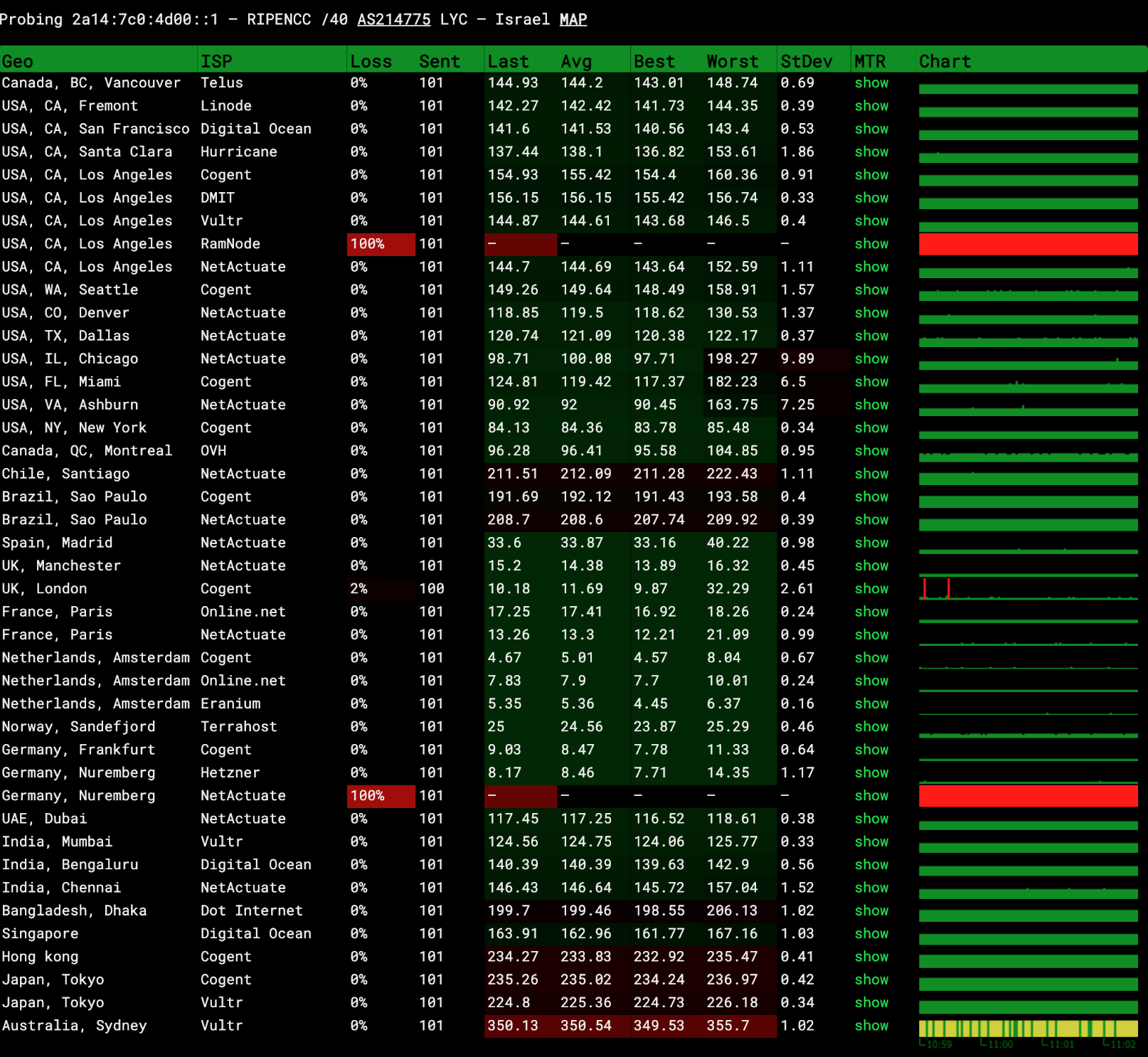 ping.pe results before Anycast (from Part 2)
 ping.pe results after Anycast
MTR trace from San Francisco:
1 | 0. localhost Loss% Snt Last Avg Best Wrst StDev AS Name PTR |
MTR trace from Paris:
1 | 0. localhost Loss% Snt Last Avg Best Wrst StDev AS Name PTR |
Running tcpdump icmp6 on all three hosts in our AS, we can observe ping requests coming from different regions. Thanks to ping.pe’s PTR records, we can clearly see where each request originates.
For example, the Singapore Vultr instance received pings from a DigitalOcean node in Singapore:
1 | 06:57:07.542784 IP6 sg-digitalocean.ping.pe > 2a14:7c0:4d00::1: ICMP6, echo request, id 45771, seq 48123, length 64 |
The US Vultr instance received pings from India, the US, and elsewhere:
1 | 07:11:23.955198 IP6 ping-pe-us-ca-sf-digitalocean-do.localdomain > 2a14:7c0:4d00::1: ICMP6, echo request, id 50875, seq 48123, length 64 |
Now, as long as we provide consistent services across all three hosts, users worldwide can enjoy low-latency, high-bandwidth, and stable access. For example, installing nginx on all servers to host my static blog. (Though to be honest, Cloudflare’s free tier still performs better.) If we set up nginx reverse proxies or DNS servers on these hosts, we’ve essentially built our own simple Anycast CDN or Anycast DNS.
However, we also notice that our Singapore Vultr instance receives the least traffic — almost only from local Singapore sources — while other Asia-Pacific regions tend to route through the US. This happens because upstream ISPs don’t always choose routes based purely on hop count or physical distance. They also consider path priority, congestion, and cost.
Network connectivity in the Asia-Pacific region is generally worse than in Europe and North America. Inter-carrier settlement costs are also much higher in APAC, with smaller bandwidth and frequent congestion. Under such conditions, traffic often takes detours (taking a roundabout path via the US). As a result, routes announced in poorly connected regions struggle to propagate to neighboring areas.
To solve connectivity issues in APAC, you either need to add more servers across the region or pay upstream providers for higher-priority routes (like the infamous “CN2 GIA” in China). This also explains why VPS services offering “optimized routing” for China or other APAC regions are usually expensive and come with lower bandwidth or data caps.
Anycast for High Availability
Anycast doesn’t just reduce latency — it also enhances availability. If any node goes offline, the BGP session drops, the route is withdrawn, and traffic automatically reroutes to the remaining nodes. As long as at least one node is up, your stateless service stays online.
Let’s test this in practice: I pinged 2a14:7c0:4d00::1 from Suzhou Mobile — traffic was routed to the German v.ps node. Meanwhile, Shanghai Unicom pings were hitting the US Vultr node. While keeping the ping running, I performed a hard reset on the US Vultr instance to simulate a server failure. Here’s the result from Shanghai Unicom:
1 | 2024/9/12 21:21:52 - Reply from 2a14:7c0:4d00::1: time=348ms |
We can see that traffic rerouted within 5 seconds. I tested this multiple times — downtime was consistently around 5 seconds. Meanwhile, the Suzhou Mobile pings (which were already routed to the German v.ps node) remained completely unaffected.
The original route from Shanghai Unicom (before failure):
1 | 1 2408:84e2:440:a210::70 AS17621 China Shanghai Shanghai chinaunicom.cn |
New route after the US Vultr instance went down:
1 | 1 2408:84e2:440:a210::70 AS17621 China Shanghai Shanghai chinaunicom.cn |
Summary
And just like that, we’ve built our own Anycast network!
Unlike traditional AS expansion, our approach doesn’t require internal connectivity between hosts or IGP protocols for internal routing. Instead, each node operates independently, forming an Anycast network to serve stateless applications. Which host a user reaches depends entirely on their network environment. Keep in mind: we can’t guarantee a user will always hit the same node. If you need to provide stateful services, you’ll need to synchronize state across all nodes yourself (e.g., via a distributed database) — but that’s a topic for another day.
That was a lot to write… This series should wrap up in one final part. Stay tuned.
This article is licensed under the CC BY-NC-SA 4.0 license.
Author: lyc8503, Article link: https://blog.lyc8503.net/en/post/asn-4-anycast-network/
If this article was helpful or interesting to you, consider buy me a coffee¬_¬
Feel free to comment in English below o/